Integrating OptiPick into SAP EWM
Introduction
Below is a schematic overview of how the pick process is handled today in SAP (on the left) and how it would look like after integrating with our OptiPick API (on the right).

Sales orders are created in SAP SD (Sales & Distribution), these are called Outbound Deliveries. These are then handed over to the EWM (Extended Warehouse Management) system to create ODOs (Outbound Delivery Orders). Optionally the unfulfilled ODOs are grouped into waves based on business rules such as grouping them by carrier or shipping times. Then, WTs (Warehouse Tasks) are created, where the correct source locations in the warehouse for the ordered SKUs are allocated. Optionally, destination sources (such as a specific Handling Unit) can be allocated here as well. After creating these tasks, WOCR (Warehouse Order Creation Rules) are triggered to group orders together into picking routes, these are called WOs (Warehouse Orders). These WOs are finally placed in a queue and assigned to pickers, who then execute these tasks by following instructions on their handheld devices.
The OptiPick API is called after the Warehouse Task Creation, when the locations to pick from are allocated by the EWM. We also recommend to run the WOCR, but to not persist those results. Running these WOCRs provide two significant advantages: (i) they allow OptiPick to calculate the as-is distances, such that you can monitor how much distance is being saved; (ii) they can serve as a fallback mechanism in the unlikely event something goes wrong. By doing this, our API is completely non-intrusive, and operations can never get disturbed.
In the remainder of this guide, we demonstrate how we could generate a request (JSON format) that could be sent to our API. It is important to note that, in order to keep this guide as general as possible, many assumptions and simplifications were made. Your company might have some specific details that would require some modifications to the examples below.
Required API data
Below is a minimal JSON (with truncated information) for the /optimize/cluster endpoint which can do both batching of Warehouse Tasks into Warehouse Orders, as well as determining the optimal sequence of the Tasks within an Order.
{
  "site_name": "Example",
  "start_points": ["START"],
  "end_points": ["END"],
  "picks": [
    {
      "pick_id": "pick_1",
      "location_id": "BH-06",
      "order_id": "order_0",
      "wave_id": "wave_0",
      "list_id": "list_0",
      "asis_sequence": 0
    },
    ...
  ],
  "parameters": {
    "max_orders": 2,
    ...
  }
}
Only the following two attributes are required at root-level of the request:
site_name: a reference to the floorplan in our OptiPick web application. This is is necessary to know the distances between all locations in the warehouse.picks: a list of Warehouse Tasks that need to be executed.
For each pick, the following attributes are required:
pick_id: a unique ID for each element. These will be reused in our response so you can easily link back to your input data.location_id: where to pick from in the warehouse. OptiPick supports multiple locations in case SKUs are spread in the warehouse.order_id: an identifier that groups picks for the same customer together. Picks with the same order_id are always picked within the same picking route (Warehouse Order)
Additionally, the following attributes can be specified for each pick:
wave_id: the results of the WOCR, picks with different wave identifiers are never grouped in the same picking route. Our algorithm applies grouping on each wave separately.list_id: an identifier grouping picks together according to the logic of SAP. As explained above, calculating & providing this is recommended. It serves as a fallback mechanism and allows to calculate the distance savings.asis_sequence: the sequence order, according to the SAP logic, in which the picks are executed within a pick route (typically a pick snake). OptiPick supports grouping optimally according to the pick snake by setting one of the parameters. To allow for this, the raw sequence values (so not the index after sorting) have to be provided.
Finally, different parameters can be provided that control the routing & clustering policy, stop conditions (under which conditions no more pick tasks can be added to a pick route), regexes to convert location IDs from the WMS to locations known to the OptiPick webapp, and more.
SAP Data tables
In the following subsections, we'll have a look at each of the relevant data tables that correspond to the components of the schematic overview above which will allow us to construct a JSON that serves as a request for our API. We'll look at the data both in the SAP GUI and by making a query in the ABAP (Advanced Business Application Programming) language.
Outbound Deliveries (LIKP, LIPS)
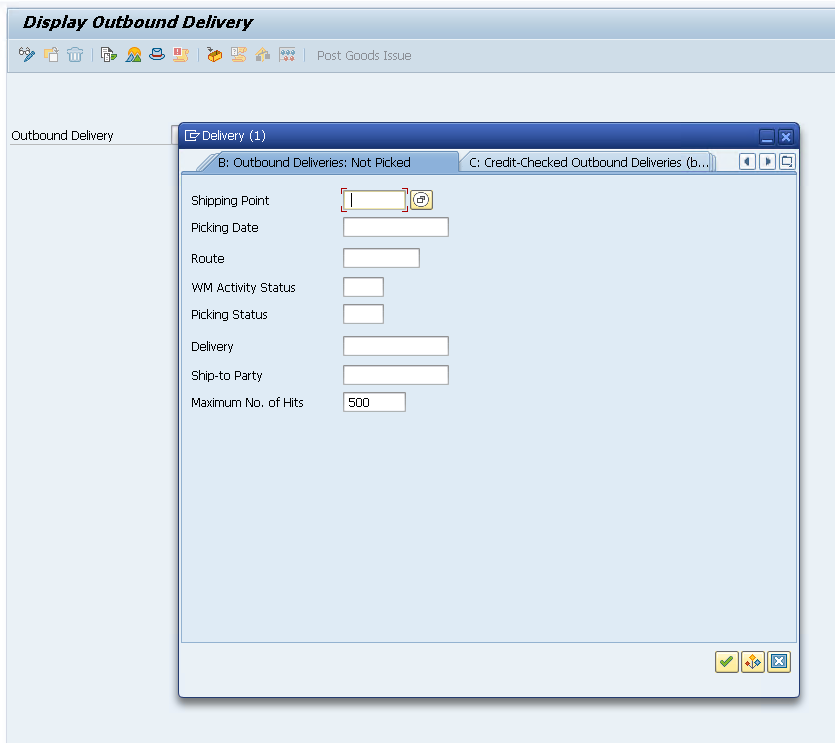
We can inspect our deliveries in the GUI by using the VL03N transaction (delivery per delivery), or by using the table viewer (SE16N) to see information of all deliveries. We'll focus on the LIPS table here, as it contains more detailed information than the LIKP table.
In the VL03N window, we start with an empty search query to see high-level information of the deliveries:
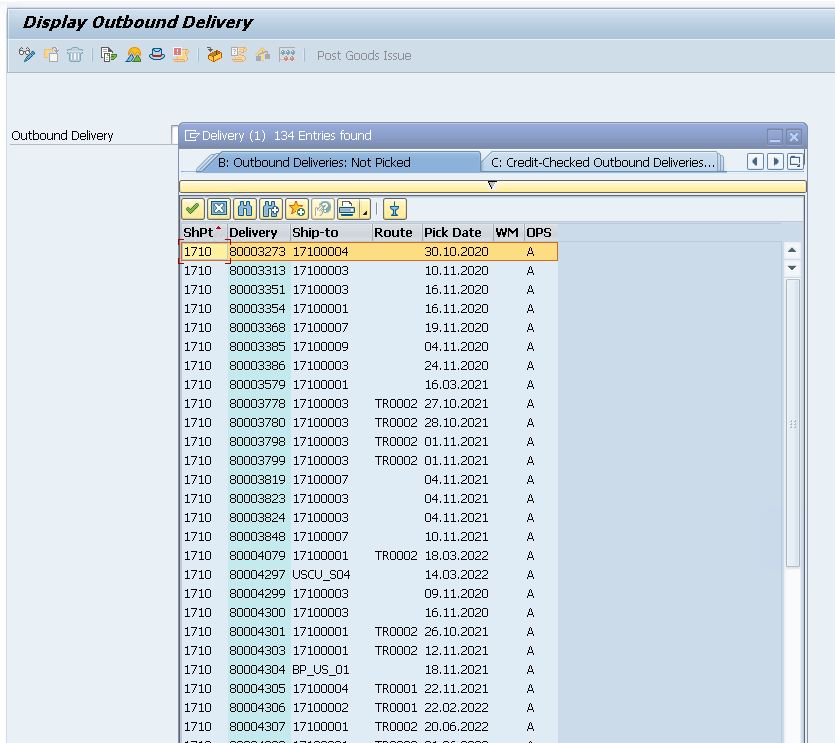
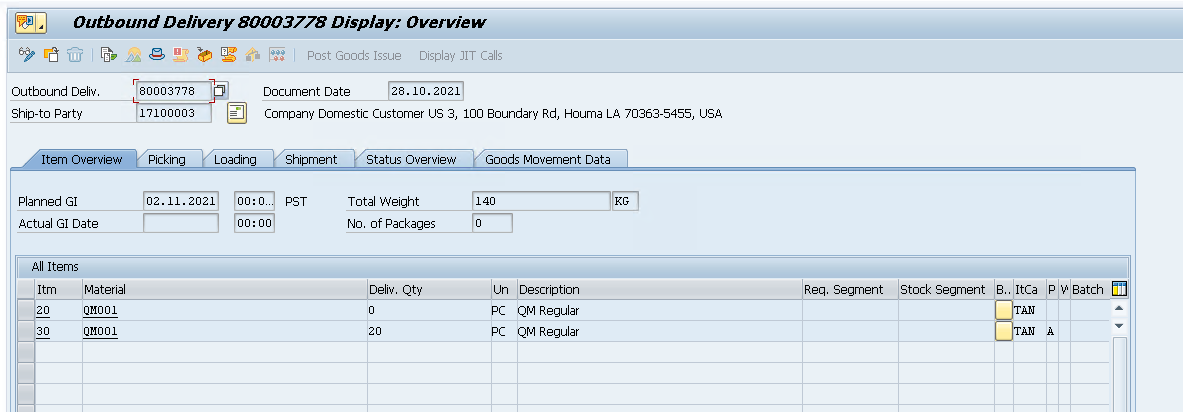
After double clicking on a delivery and pressing ENTER, we can see its details:
We can also use the table viewer (/nSE16)
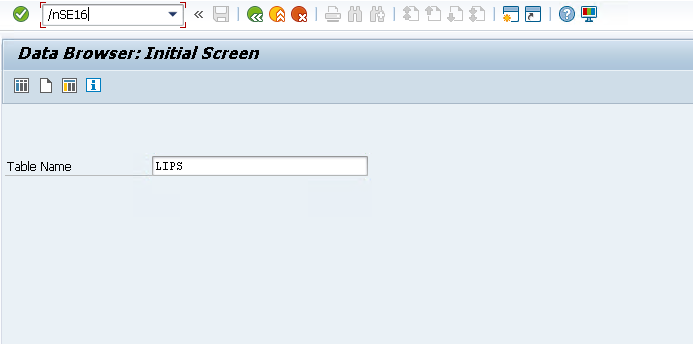
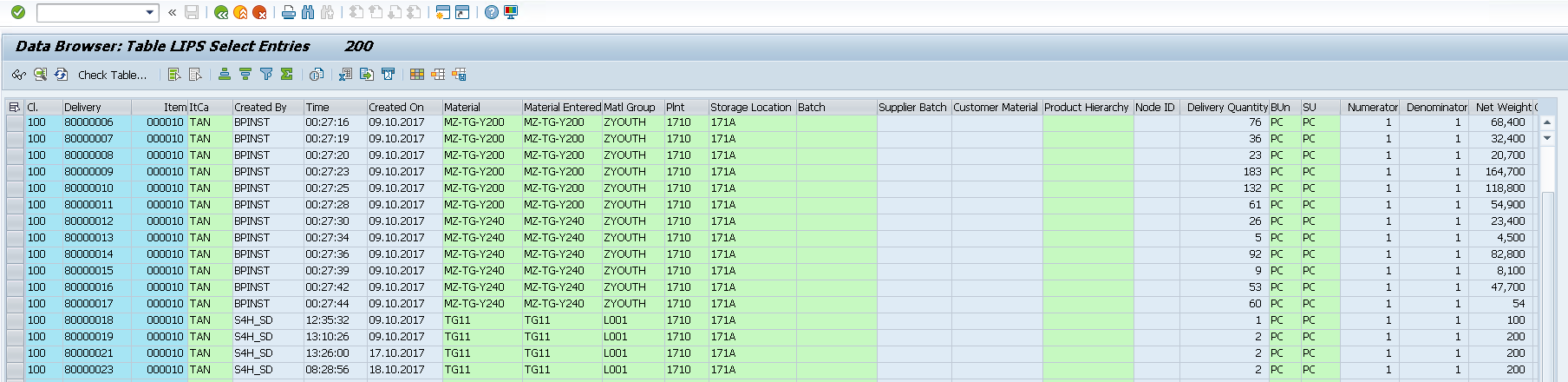
Each line in this table corresponds to a pick element for our API request. The table contains many columns, but we only need three pieces of data: (i) the Delivery corresponds to an order_id; (ii) the Item can be used to construct a unique pick_id after concatenating it to Delivery; (iii) the Material corresponds to the sku_id and can be used to join to other tables to get other information such as the location_id.
Let's write a small query that retrieves these 3 attributes from the LIPS table and graphically displays the first 5 rows:
REPORT query_LIPS.

TYPES: BEGIN OF ty_lips_min,
         vbeln TYPE vbeln_vl,  " Delivery
         posnr TYPE posnr_vl,  " Item
         matnr TYPE matnr,     " Material
       END OF ty_lips_min.
TYPES tt_lips_min TYPE STANDARD TABLE OF ty_lips_min WITH EMPTY KEY.

DATA lt_lips TYPE tt_lips_min.

SELECT l~vbeln, l~posnr, l~matnr
  FROM lips AS l
  INNER JOIN likp AS h ON h~vbeln = l~vbeln
  INTO TABLE @lt_lips
  WHERE h~vstel = '1710'  " SAP Warehouse ID
    AND h~vbtyp = 'J'     " Outbound delivery
    AND h~wbstk <> 'C'    " Not completely processed
    AND l~lfimg > 0.      " Quantity > 0 (optional)

IF lt_lips IS INITIAL.
  WRITE: / 'No delivery items (LIPS) found for the selection.'.
  RETURN.
ENDIF.

"--- Show first 5 rows as a preview
DATA lt_preview TYPE tt_lips_min.
lt_preview = lt_lips.

IF lines( lt_preview ) > 5.
  DELETE lt_preview FROM 6 TO lines( lt_preview ).
ENDIF.

cl_demo_output=>display( lt_preview ).

Outbound Delivery Orders (/SCWM/PRDO, /SCDL/*)
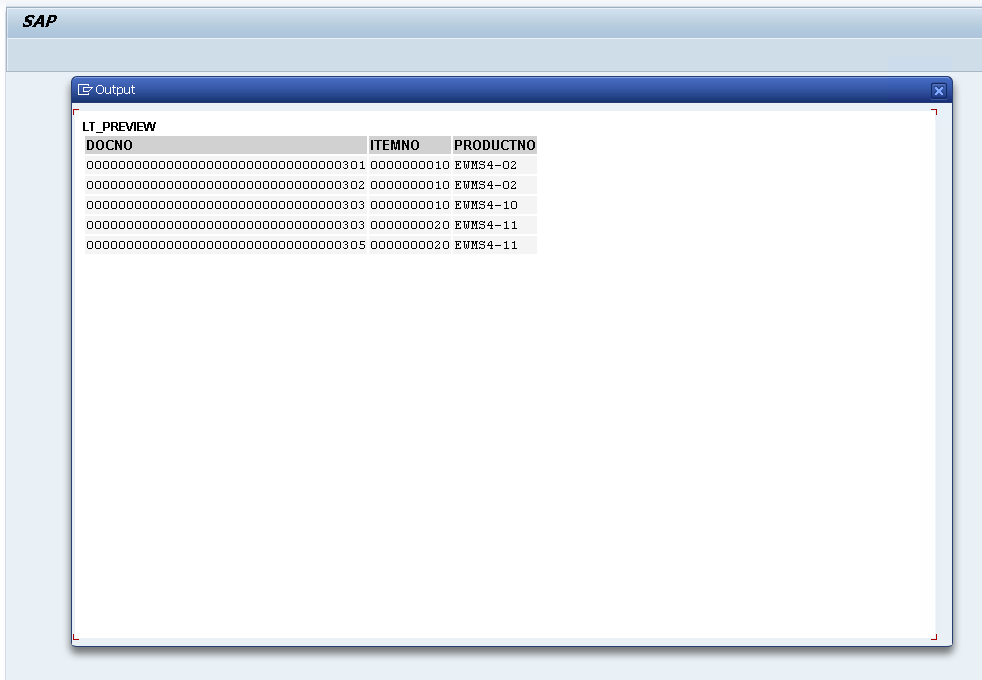
The information we need to retrieve from these tables is very similar to the LIPS table, but it has the advantage that they have already been transferred from SAP SD to SAP EWM. In the GUI, we can view detailed information for each ODO in /n/SCWM/PRDO. Ideally, the information sent to our API should come from this table, and not the LIPS table. However, in the sandbox environment of SAP, this table does not contain many rows which is why we opted to use the LIPS table instead.
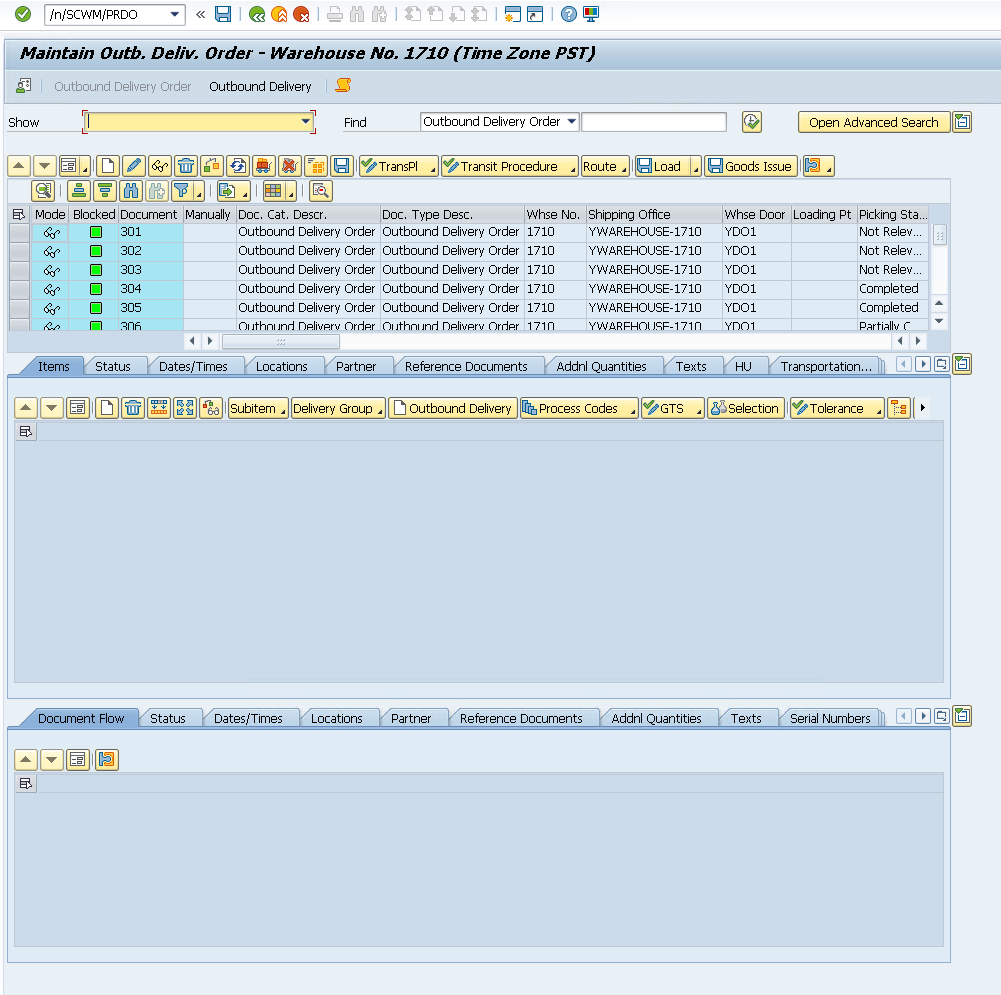
Let's query /SCDL/PROCI_O (I suffix in PROCI stands for Item-Level, _O suffix stands for Outbound).
REPORT zquery_proci_o_min.

TYPES: BEGIN OF ty_proci_min,
         docno     TYPE /SCDL/DL_DOCNO_INT,  " Sales Document Number
         itemno    TYPE /SCDL/DL_ITEMNO,     " Order Line / Item Number
         productno TYPE /SCDL/DL_PRODUCTNO,  " Product Number
       END OF ty_proci_min.
TYPES tt_proci_min TYPE STANDARD TABLE OF ty_proci_min WITH EMPTY KEY.

DATA lt_proci TYPE tt_proci_min.

SELECT docno, itemno, productno
  FROM /scdl/db_proci_o
  INTO TABLE @lt_proci
  WHERE /scwm/whno = '1710'      " hardcoded WH
        AND doccat = 'PDO'.

IF lt_proci IS INITIAL.
  WRITE: / 'No /SCDL/DB_PROCI_O items for LGNUM 1710.'.
  RETURN.
ENDIF.

" show first 5 rows only
DATA lt_preview TYPE tt_proci_min.
lt_preview = lt_proci.
IF lines( lt_preview ) > 5.
  DELETE lt_preview FROM 6 TO lines( lt_preview ).
ENDIF.

cl_demo_output=>display( lt_preview ).
Locations (SCWM/BINMAT, /SCWM/AQUA, /SAPAPO/MATKEY, ...)
Depending on whether your warehouse using fixed location allocation or dynamic slotting, the information of where each product is stored in the warehouse might be stored in different tables.
In the example below, we'll assume dynamic slotting and join the AQUA and MATKEY tables together on their MATID, after converting one of them to the corresponding format. To resolve conflicts (locations with more than 1 SKU in the table), we'll take the most recent record.
In the case you would use fixed bin allocation, you could use the SCWM/BINMAT table instead.
Let's first extract the necessary data from the MATKEY table. We'll need a matnr and matid. matnr corresponds to the productno from the /SCDL/PROCI_O table or the matnr from the LIPS table. We will need matid to join it with the AQUA table to find locations.
REPORT z_step1_matkey_min.

TYPES: BEGIN OF ty_matkey_min,
         matnr TYPE matnr,
         matid TYPE /sapapo/matkey-matid,
       END OF ty_matkey_min.
TYPES tt_matkey_min TYPE STANDARD TABLE OF ty_matkey_min WITH EMPTY KEY.

DATA lt_matkey TYPE tt_matkey_min.
DATA lt_preview TYPE tt_matkey_min.

SELECT matnr, matid
  FROM /sapapo/matkey
  INTO TABLE @lt_matkey
  WHERE matid IS NOT NULL AND matid <> ''.

IF lt_matkey IS INITIAL.
  WRITE: / '/SAPAPO/MATKEY: no rows with MATID.'.
  LEAVE PROGRAM.
ENDIF.

lt_preview = lt_matkey.
IF lines( lt_preview ) > 10.
  DELETE lt_preview FROM 11 TO lines( lt_preview ).
ENDIF.
cl_demo_output=>display( lt_preview ).
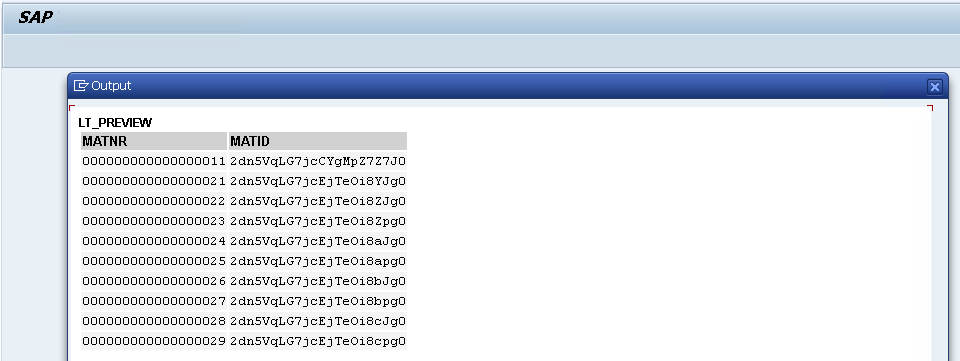
Now we extract data from the /SCWM/AQUA table which contains warehouse location information for each SKU. We will extract lgpla and matid. lgpla is the location id, and matid to join it with the table we retrieved in the previous step.
REPORT z_step2_aqua_min.

CONSTANTS c_lgnum TYPE /scwm/lgnum VALUE '1710'.

TYPES: BEGIN OF ty_aqua_sel,
         lgpla TYPE /scwm/lgpla,
         matid TYPE /scwm/aqua-matid,
       END OF ty_aqua_sel.
TYPES tt_aqua_sel TYPE STANDARD TABLE OF ty_aqua_sel WITH EMPTY KEY.

DATA lt_aqua    TYPE tt_aqua_sel.
DATA lt_preview TYPE tt_aqua_sel.

SELECT lgpla, matid
  FROM /scwm/aqua
  INTO TABLE @lt_aqua
  WHERE lgnum = @c_lgnum
    AND lgpla <> ''.

IF lt_aqua IS INITIAL.
  WRITE: / '/SCWM/AQUA: no rows for LGNUM ', c_lgnum, '.'.
  LEAVE PROGRAM.
ENDIF.

lt_preview = lt_aqua.
IF lines( lt_preview ) > 10.
  DELETE lt_preview FROM 11 TO lines( lt_preview ).
ENDIF.
cl_demo_output=>display( lt_preview ).
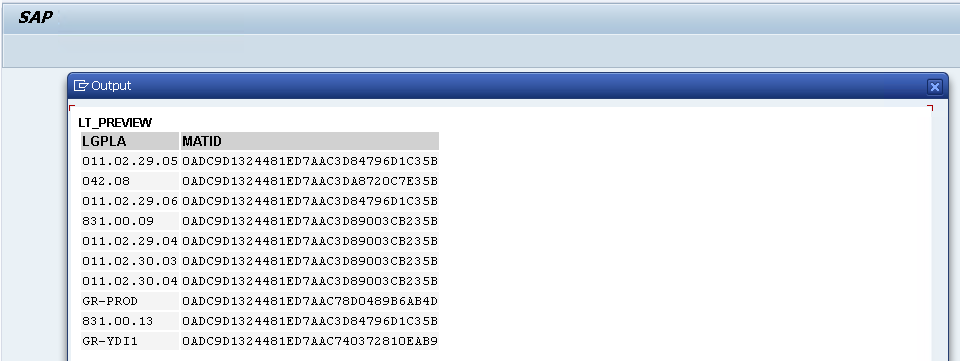
We notice an additional challenge. The matid from /SAPAPO/MATKEY seems to be in a different format (C22) than matid from /SCWM/AQUA (X16). To solve this, we apply conversion on the MATKEY values.
REPORT z_step3_convert_uuid_min.

TYPES: BEGIN OF ty_src,
         matnr     TYPE matnr,
         matid_c22 TYPE /sapapo/matkey-matid,
       END OF ty_src.
DATA lt_src TYPE STANDARD TABLE OF ty_src.

TYPES: BEGIN OF ty_out,
         matnr     TYPE matnr,
         matid_c22 TYPE /sapapo/matkey-matid,
         matid_x16 TYPE /scwm/aqua-matid, "RAW16
       END OF ty_out.
DATA lt_out TYPE STANDARD TABLE OF ty_out.
DATA ls_out TYPE ty_out.

DATA lv_x16 TYPE /scwm/aqua-matid.

SELECT matnr, matid
  FROM /sapapo/matkey
  INTO TABLE @lt_src
  WHERE matid IS NOT NULL AND matid <> ''.

LOOP AT lt_src INTO DATA(ls_src).
  CLEAR: lv_x16, ls_out.
  TRY.
      cl_system_uuid=>convert_uuid_c22_static(
        EXPORTING uuid     = ls_src-matid_c22
        IMPORTING uuid_x16 = lv_x16 ).
    CATCH cx_uuid_error.
      CONTINUE.
  ENDTRY.

  ls_out-matnr     = ls_src-matnr.
  ls_out-matid_c22 = ls_src-matid_c22.
  ls_out-matid_x16 = lv_x16.
  APPEND ls_out TO lt_out.
ENDLOOP.

cl_demo_output=>display( lt_out ).
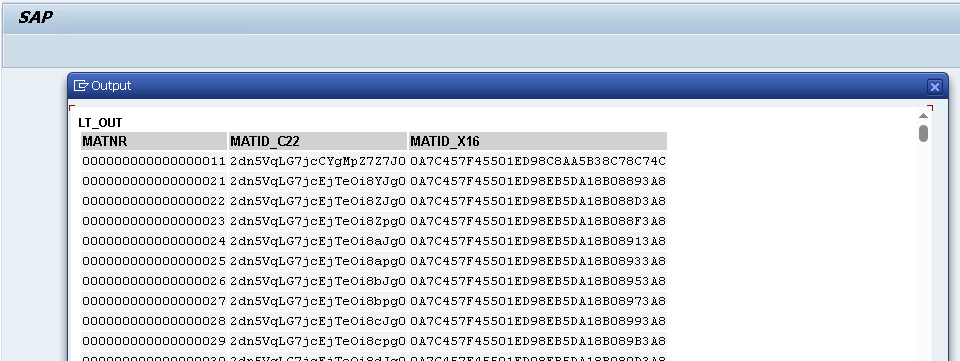
Finally, we throw it all together, and resolve conflicts by taking the most recent rows from AQUA in case we have multiple SKUs on the same location, or multiple locations for the same SKU (the latter could actually be resolved by just passing every location for an SKU to our API).
REPORT z_build_lt_dict_min.

CONSTANTS c_lgnum TYPE /scwm/lgnum VALUE '1710'.

TYPES: BEGIN OF ty_dict,
         matnr TYPE matnr,
         lgpla TYPE /scwm/lgpla,
       END OF ty_dict.
TYPES tt_dict TYPE STANDARD TABLE OF ty_dict WITH EMPTY KEY.
DATA  lt_dict TYPE tt_dict.

TYPES: BEGIN OF ty_matkey_min,
         matnr TYPE matnr,
         matid TYPE /sapapo/matkey-matid,
       END OF ty_matkey_min.
DATA  lt_matkey TYPE STANDARD TABLE OF ty_matkey_min.

TYPES: BEGIN OF ty_map_x,
         matnr     TYPE matnr,
         matid_x16 TYPE /scwm/aqua-matid,
       END OF ty_map_x.
DATA  lt_map_x TYPE STANDARD TABLE OF ty_map_x.

TYPES: BEGIN OF ty_aqua_sel,
         lgpla TYPE /scwm/lgpla,
         matid TYPE /scwm/aqua-matid,
       END OF ty_aqua_sel.
DATA  lt_aqua TYPE STANDARD TABLE OF ty_aqua_sel.

FIELD-SYMBOLS: <mk>     LIKE LINE OF lt_matkey,
               <mx_fix> LIKE LINE OF lt_map_x,
               <aq>     LIKE LINE OF lt_aqua,
               <mx>     LIKE LINE OF lt_map_x.

"===========================================================================
" 1) Read MATKEY and convert MATID (C22/...)-> X16 so it matches AQUA-MATID
"===========================================================================
SELECT matnr, matid
  FROM /sapapo/matkey
  INTO TABLE @lt_matkey
  WHERE matid IS NOT NULL AND matid <> ''.

IF lt_matkey IS INITIAL.
  WRITE: / '/SAPAPO/MATKEY has no materials with MATID.'.
  LEAVE PROGRAM.
ENDIF.

LOOP AT lt_matkey ASSIGNING <mk>.
  IF <mk>-matid IS INITIAL.
    CONTINUE.
  ENDIF.

  DATA lv_x16 TYPE /scwm/aqua-matid.
  TRY.
      cl_system_uuid=>convert_uuid_c22_static(
        EXPORTING uuid     = <mk>-matid
        IMPORTING uuid_x16 = lv_x16 ).
    CATCH cx_uuid_error.
      CONTINUE. "skip malformed UUIDs
  ENDTRY.

  APPEND VALUE ty_map_x( matnr = <mk>-matnr matid_x16 = lv_x16 ) TO lt_map_x.
ENDLOOP.

" normalize MATNR (leading zeros) and drop duplicates
LOOP AT lt_map_x ASSIGNING <mx_fix>.
  DATA lv_m_fix TYPE matnr.
  lv_m_fix = <mx_fix>-matnr.
  CALL FUNCTION 'CONVERSION_EXIT_ALPHA_INPUT'
    EXPORTING input  = lv_m_fix
    IMPORTING output = lv_m_fix.
  <mx_fix>-matnr = lv_m_fix.
ENDLOOP.
DELETE ADJACENT DUPLICATES FROM lt_map_x COMPARING matnr matid_x16.

IF lt_map_x IS INITIAL.
  WRITE: / 'No valid MATNR <-> MATID_X16 pairs after conversion.'.
  LEAVE PROGRAM.
ENDIF.

"===========================================================================
" 2) Read AQUA (bins) for this LGNUM and keep minimal fields
"===========================================================================
SELECT lgpla, matid
  FROM /scwm/aqua
  INTO TABLE @lt_aqua
  WHERE lgnum = @c_lgnum
    AND lgpla <> ''.

IF lt_aqua IS INITIAL.
  WRITE: / 'AQUA returned no stock rows for LGNUM ', c_lgnum, '.'.
  LEAVE PROGRAM.
ENDIF.

"===========================================================================
" 3) Build lt_dict: latest AQUA row wins per MATNR
"    (iterate AQUA backwards; linear search on lt_map_x by MATID_X16)
"===========================================================================
CLEAR lt_dict.
SORT lt_map_x BY matid_x16.

LOOP AT lt_aqua ASSIGNING <aq> FROM lines( lt_aqua ) TO 1 STEP -1.
  UNASSIGN <mx>.
  LOOP AT lt_map_x ASSIGNING <mx> WHERE matid_x16 = <aq>-matid.
    EXIT.
  ENDLOOP.

  IF <mx> IS ASSIGNED AND <mx>-matnr IS NOT INITIAL
     AND NOT line_exists( lt_dict[ matnr = <mx>-matnr ] ).
    APPEND VALUE ty_dict( matnr = <mx>-matnr lgpla = <aq>-lgpla ) TO lt_dict.
  ENDIF.
ENDLOOP.

IF lt_dict IS INITIAL.
  WRITE: / 'Could not resolve any MATNR -> LGPLA from AQUA.'.
  LEAVE PROGRAM.
ENDIF.

"--- (Optional) quick preview: first 10 mappings
DATA lt_preview TYPE tt_dict.
lt_preview = lt_dict.
IF lines( lt_preview ) > 10.
  DELETE lt_preview FROM 11 TO lines( lt_preview ).
ENDIF.
cl_demo_output=>display( lt_preview ).

Warehouse Tasks & Orders (/SCWM/ORDIM_O, /SCWM/ORDIM_C)
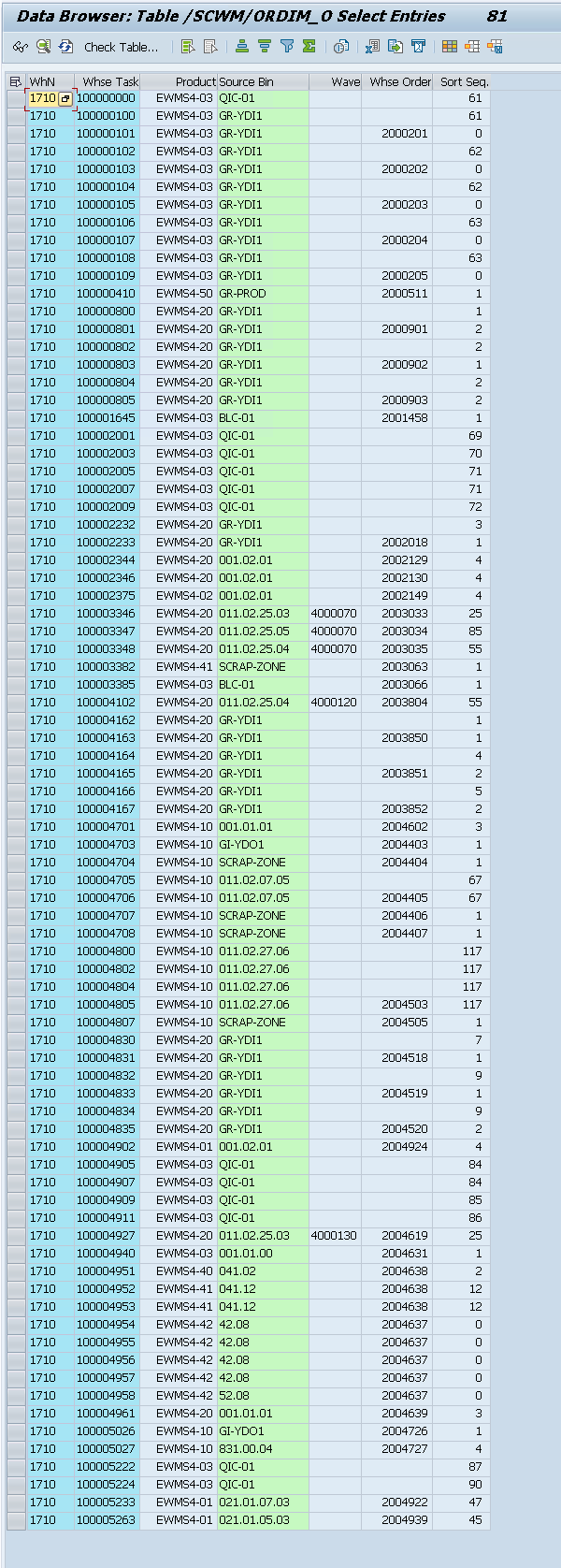
These are the tables where the results will be persisted too. Below is a filtered view of the /SCWM/ORDIM_O table.
Setting up a connection with OptiPick
We need to allow our SAP system to make a connection the OptiPick API. This can be configured in /nSTRUST and /nSM59. For this, we need to download the Certificate of our OptiPick API to upload it here. The certificate can be downloaded from the browser (https://optipick.api.optioryx.com/). Below are screenshots to do it in Google Chrome:
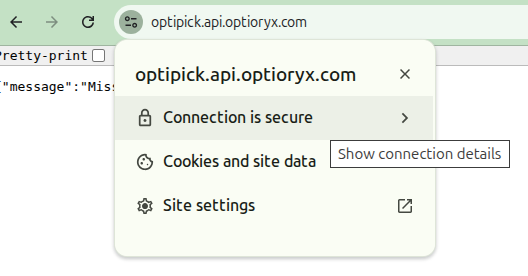
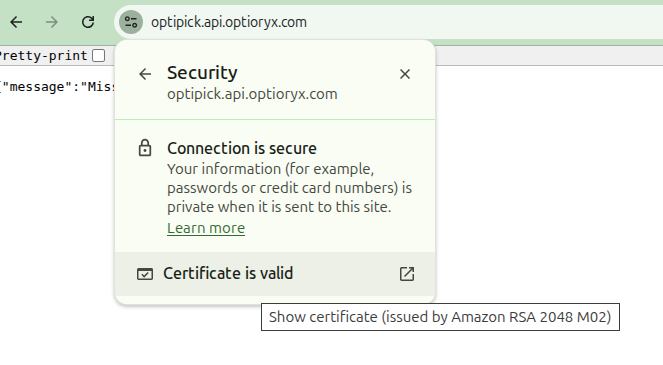
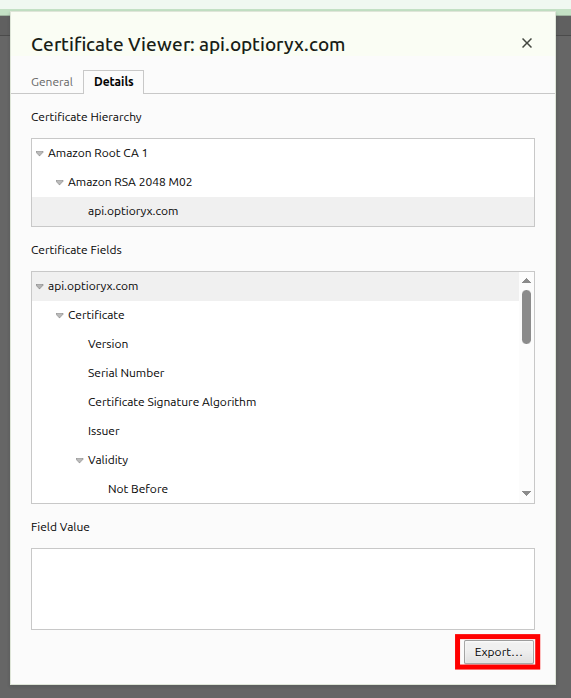
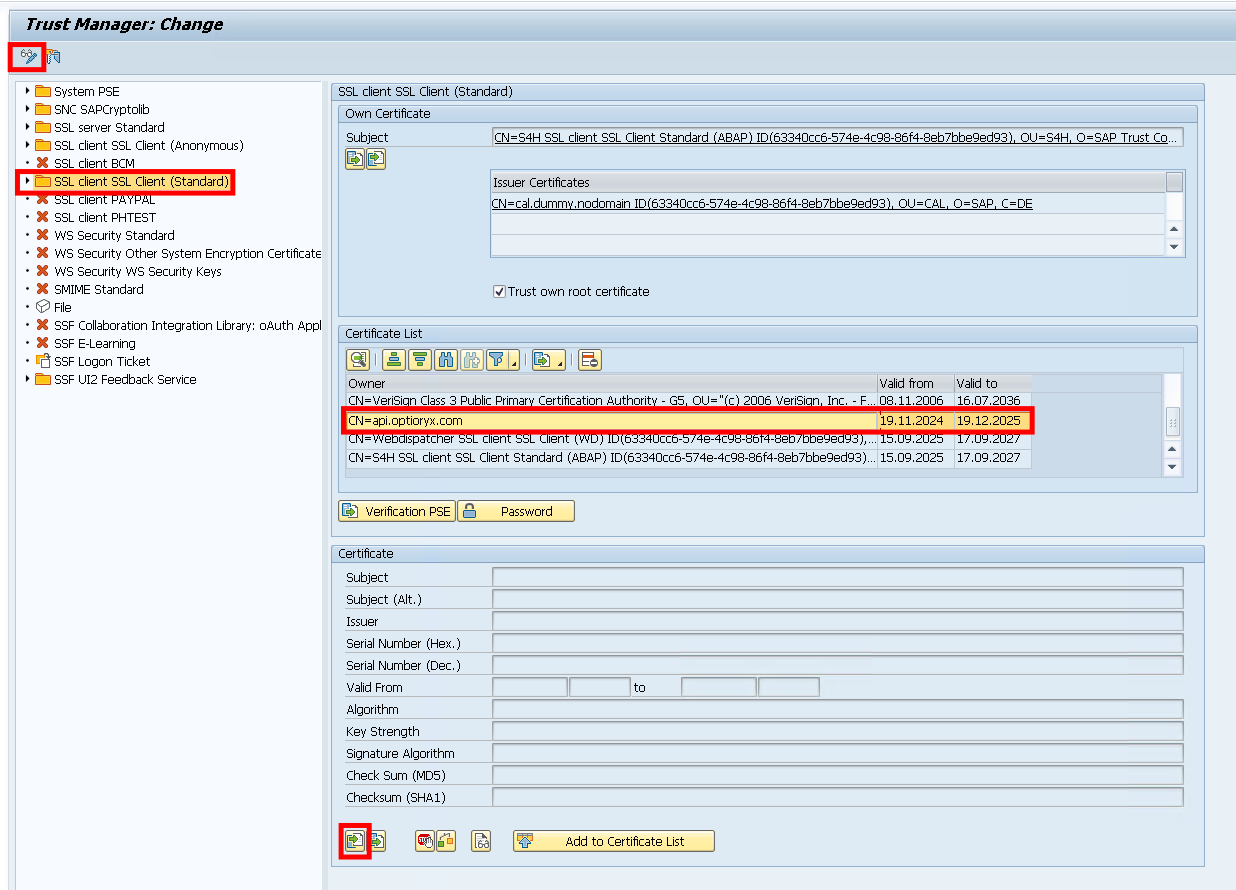
Most export formats will work, so choose your favourite. Afterwards, go to /nSTRUST in SAP and upload the certificate here. You should see it added in the Certificate List (middle panel).
After adding the certificate, we add an extra connection using /nSM59. In here, create a new "HTTP Connection to External Server".
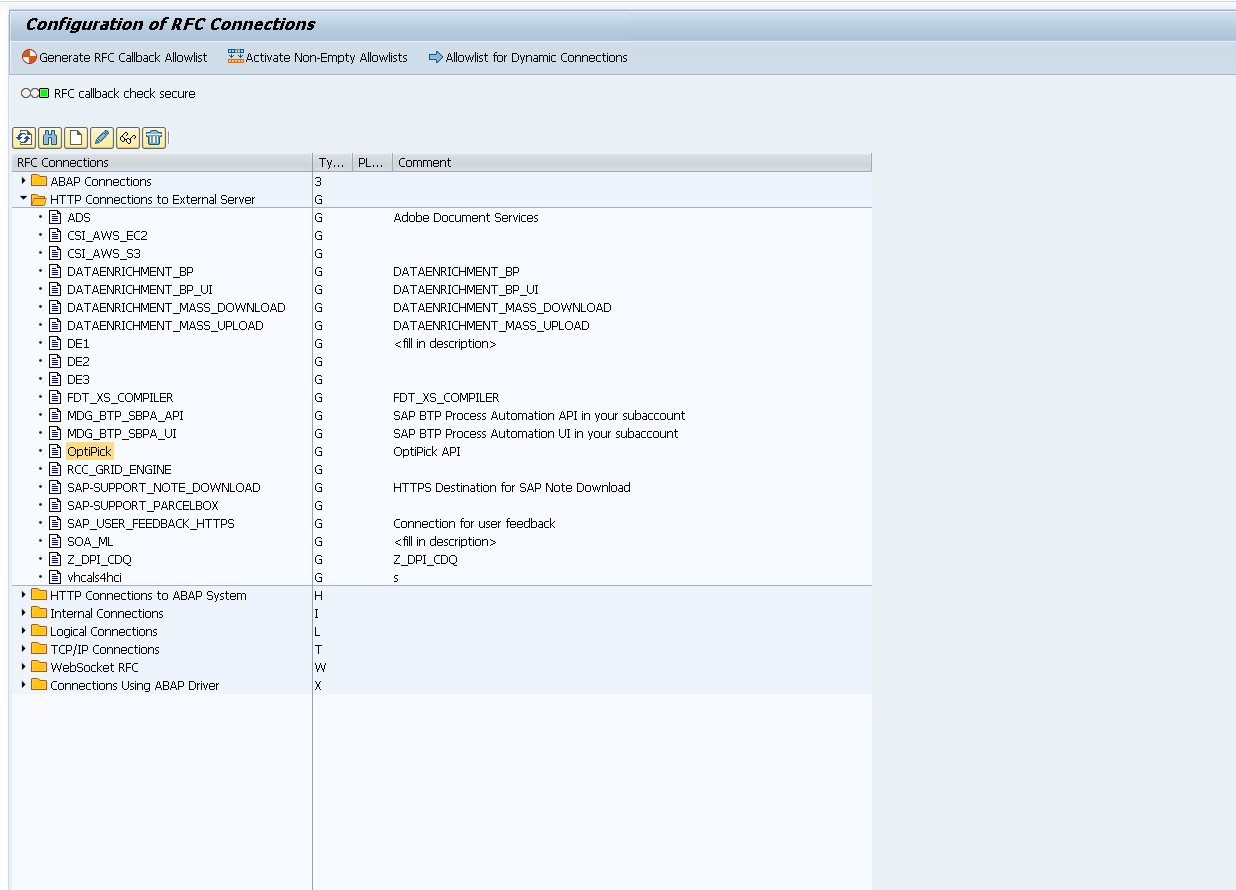
Then fill in the following information in the "Technical Settings" and "Logon & Security" tabs.
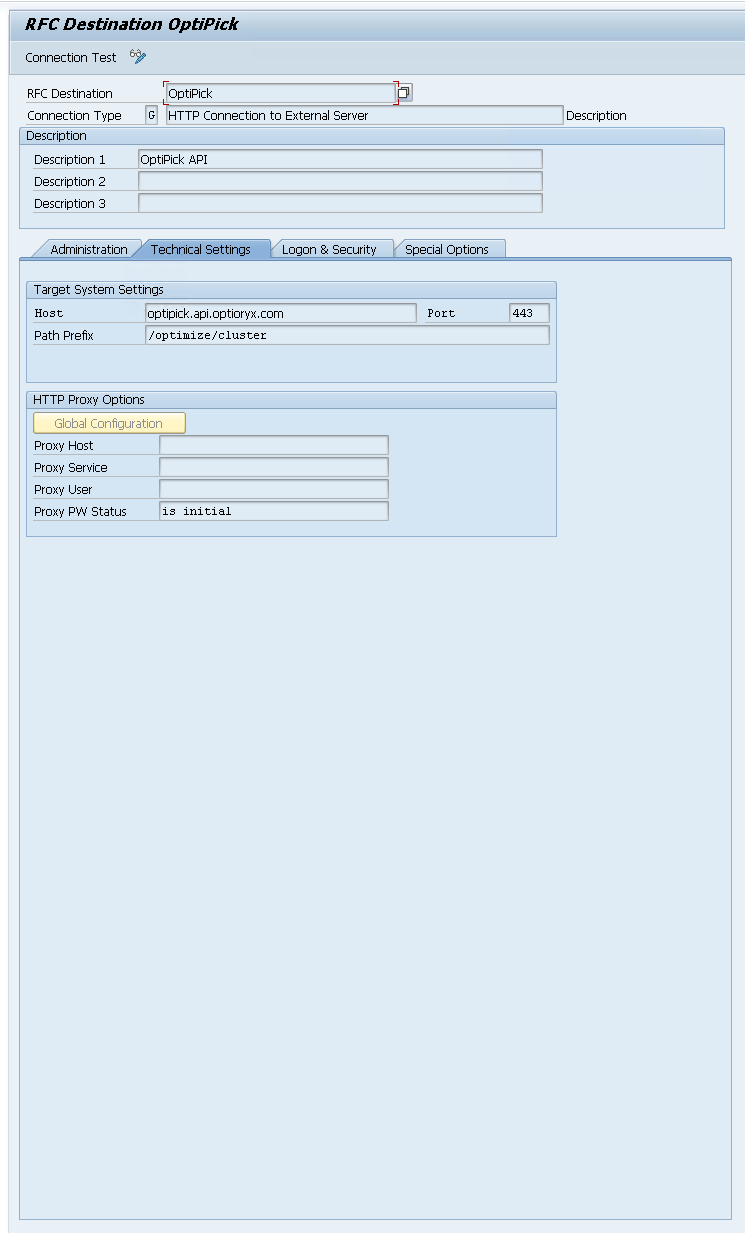
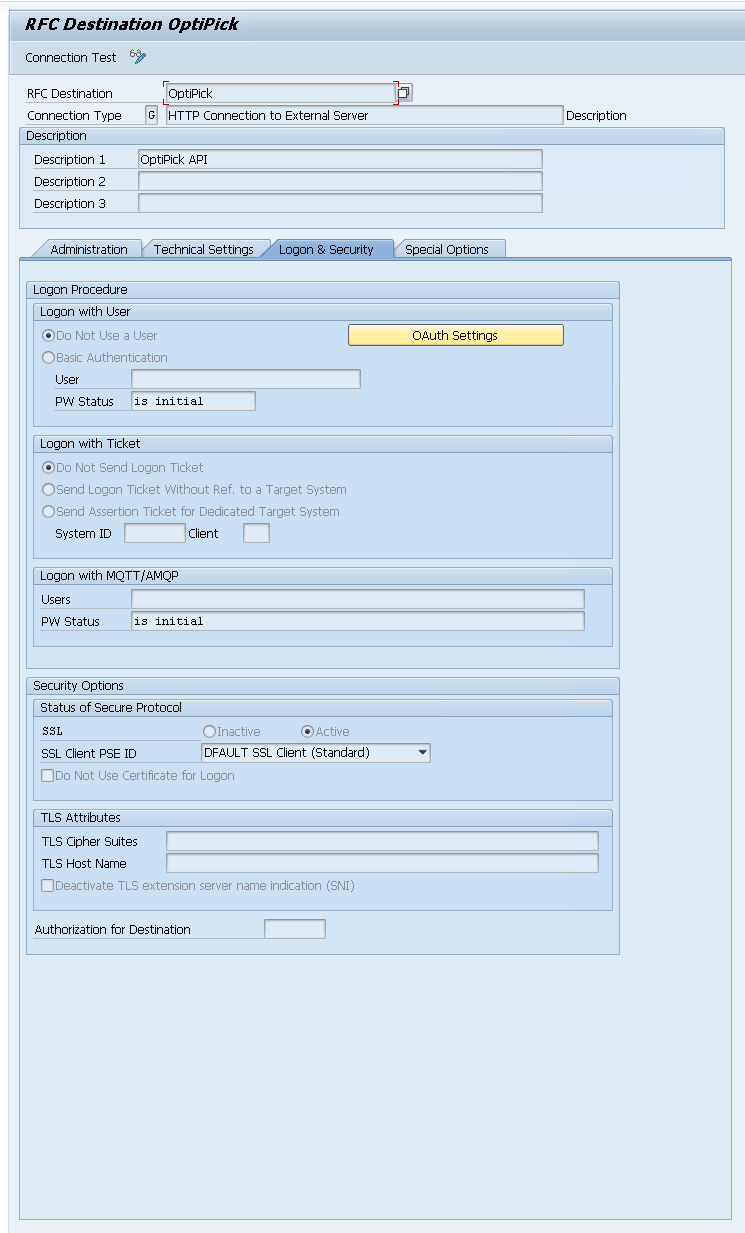
When configured, you can run a "Connection Test" from here:
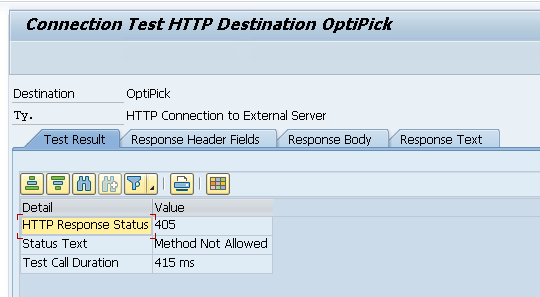
We get Error 405 from our API, but this makes sense as the Connection Test just sends a simple GET request (while our API expects a POST). This confirms our connection works! Within ABAP we can use this with the http_client as follows:
DATA: lo_http      TYPE REF TO if_http_client.

cl_http_client=>create_by_destination(
  EXPORTING destination = 'OptiPick'
  IMPORTING client      = lo_http ).
Creating the warehouse in OptiPick
For our algorithm to know the distances between every pair of locations in your warehouse, a floorplan needs to be drawn (or uploaded in Excel format) to our webapplication at https://optipick.optioryx.com/.
We created one with the name "SAP". This is the site_name we will use in our API request.
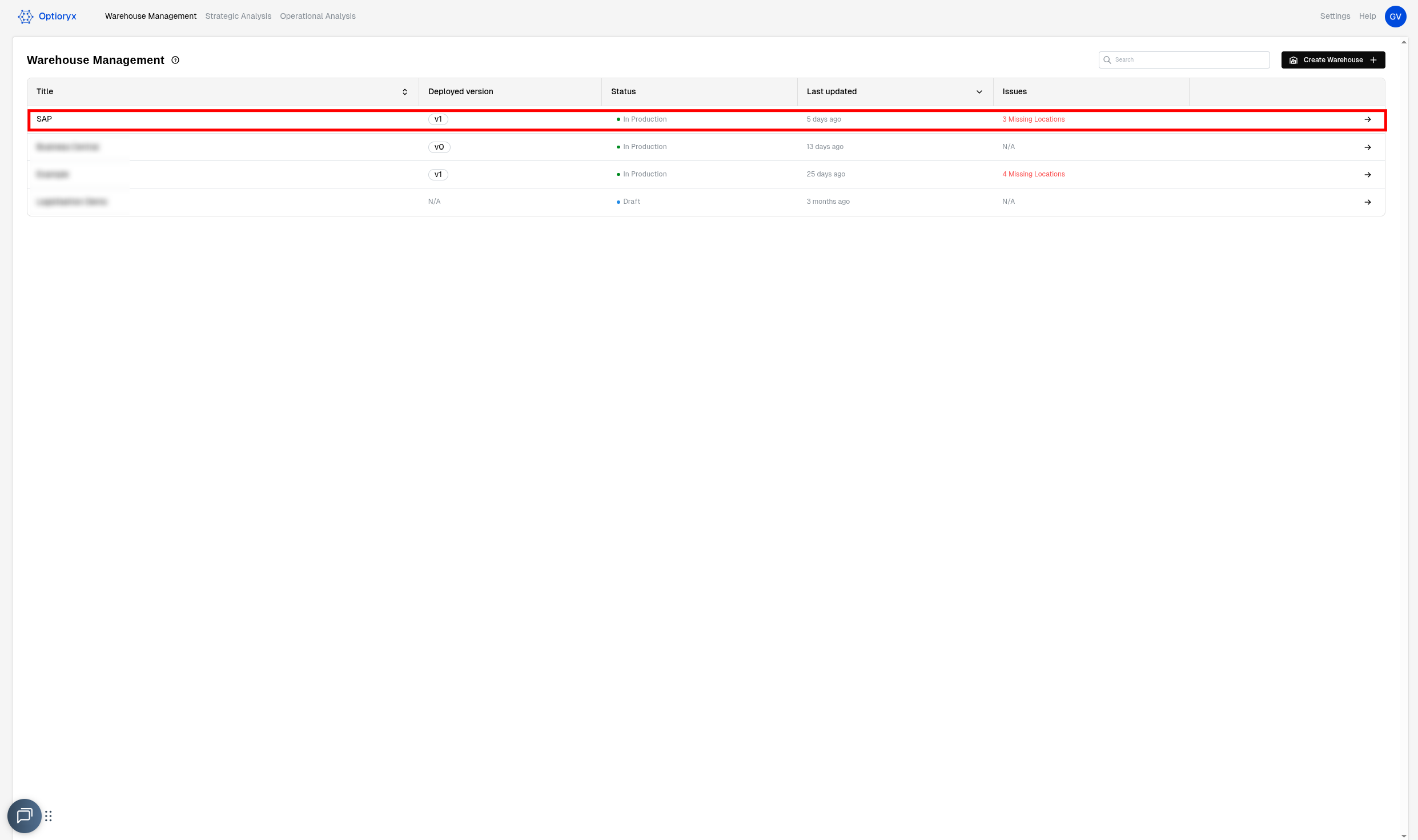
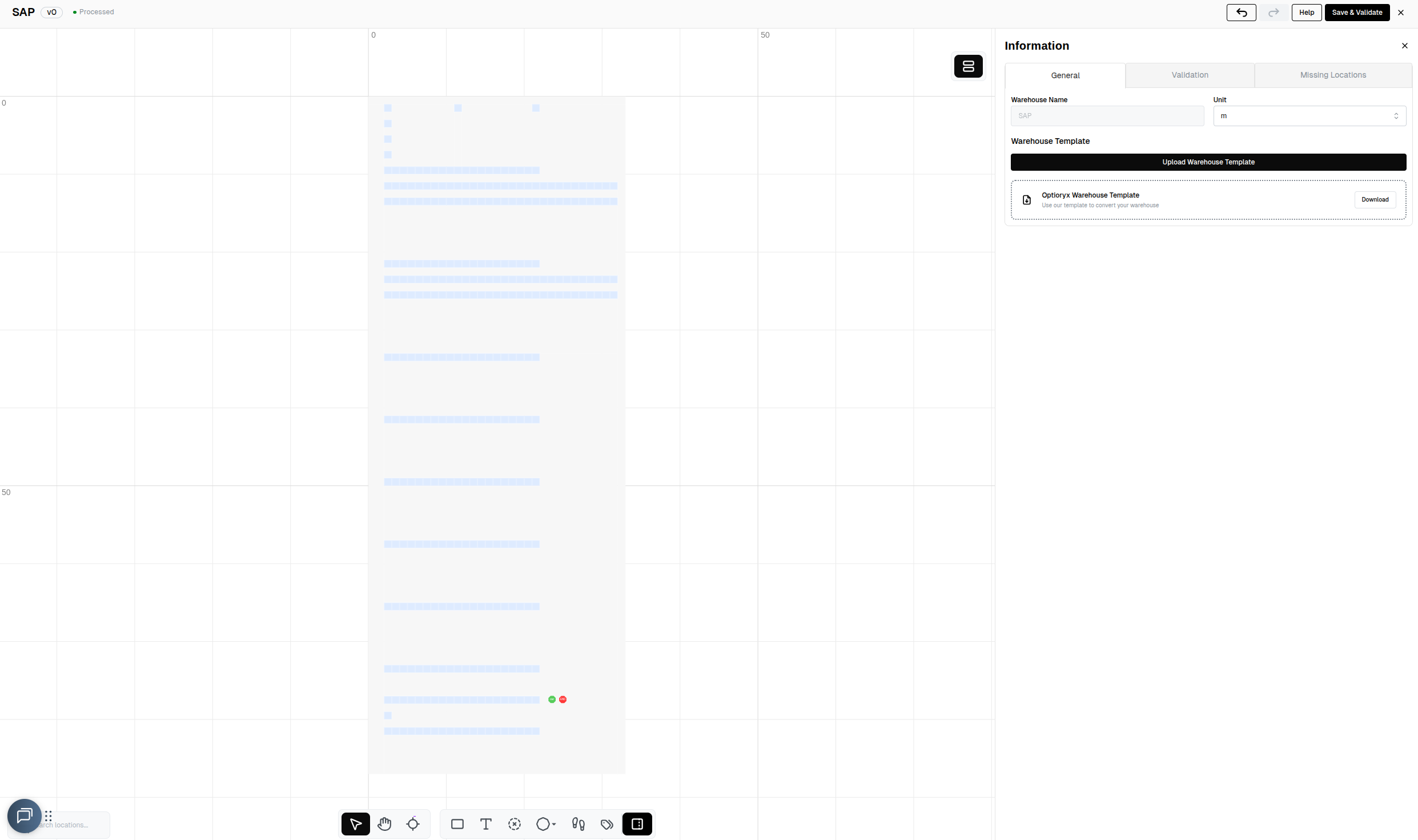
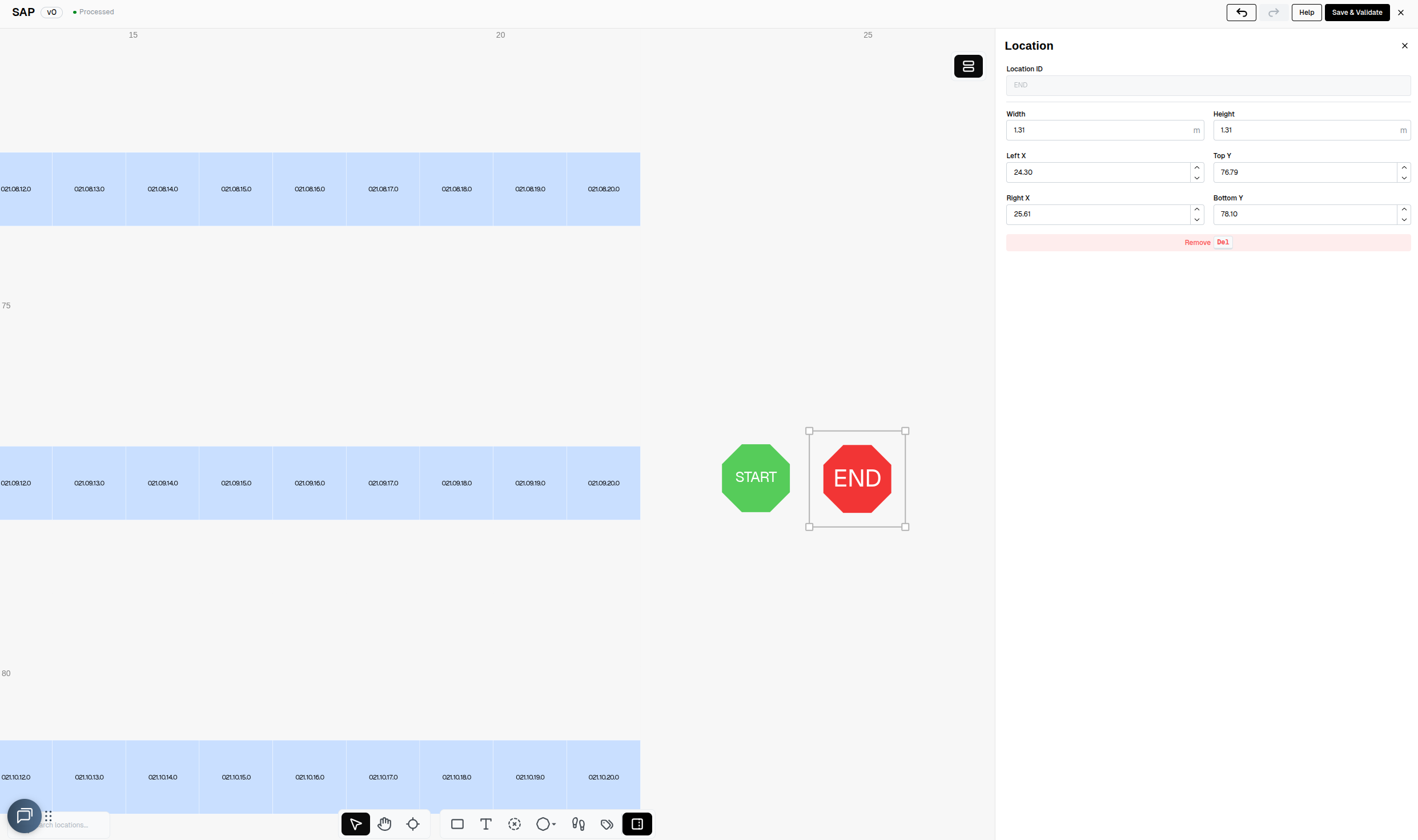
The location regex provided as one of the parameters to our API is used to convert the names of the locations in your WMS to the names of the locations in our webapp. In the example below, the trailing letter from the location names in our WMS is stripped.
ABAP script to generate request
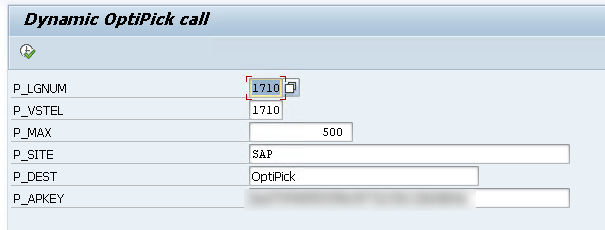
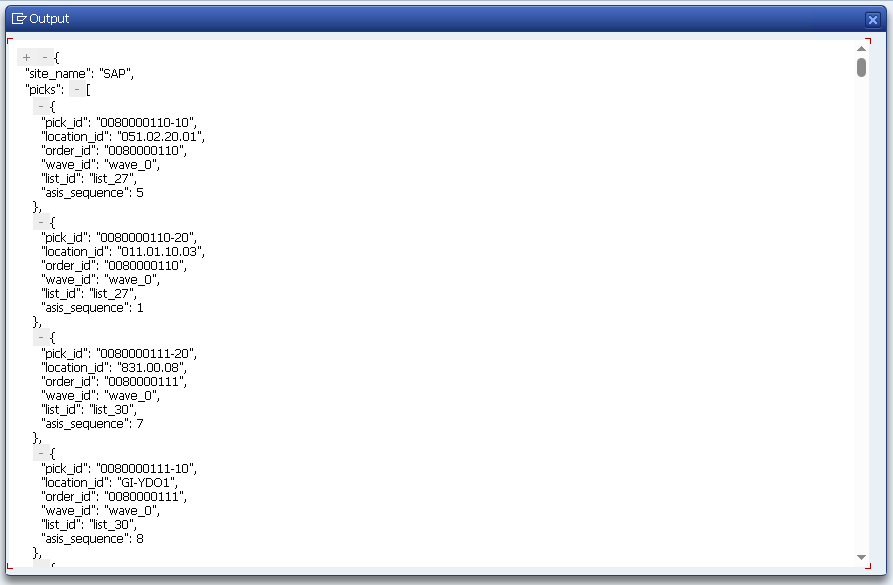
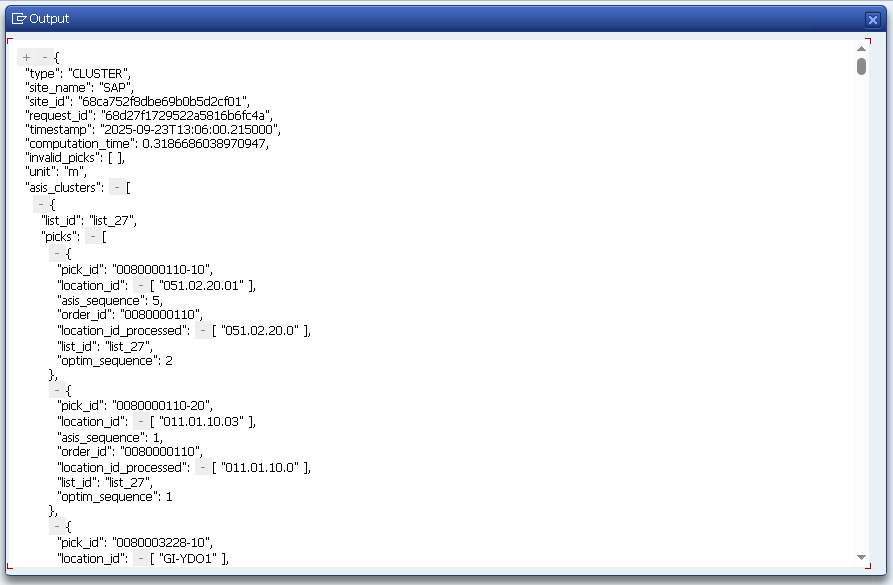
We're now ready to throw everything we've discussed so far together into one big script that generates a JSON that serves as a request for our API, send this JSON through the HTTP client to our API and then print out the response. We will leave out the parsing/processing of our response and persisting those results in the EWM from the script here. We will just group two orders per pick route, and do random grouping to simulate the as-is grouping. The asis_sequences are retrieved from the correct tables.
REPORT zopti_group_odos2json.

"---------------- Parameters ----------------
PARAMETERS: p_lgnum TYPE /scwm/lgnum OBLIGATORY DEFAULT '1710',
            p_vstel TYPE vstel       DEFAULT '1710',      " shipping point filter (LIKP)
            p_max   TYPE i           DEFAULT 500,          " max items to send
            p_site  TYPE string      DEFAULT 'SAP',
            p_dest  TYPE rfcdest     OBLIGATORY DEFAULT 'OptiPick', " SM59 HTTP dest
            p_apkey TYPE string      LOWER CASE OBLIGATORY
                        DEFAULT '<CENSORED>'.

"---------------- Types ----------------
TYPES: BEGIN OF ty_pick,
         pick_id        TYPE string,
         location_id    TYPE string,
         order_id       TYPE vbeln_vl,
         wave_id        TYPE string,
         list_id        TYPE string,
         asis_sequence TYPE i,          " <-- NEW
       END OF ty_pick.
TYPES: tt_pick TYPE STANDARD TABLE OF ty_pick WITH EMPTY KEY.

TYPES: ty_regex_pair     TYPE string_table.
TYPES: tt_location_regex TYPE STANDARD TABLE OF ty_regex_pair WITH EMPTY KEY.

" And make sure ty_params includes it:
TYPES: BEGIN OF ty_params,
         max_orders     TYPE i,
         location_regex TYPE tt_location_regex,
         routing_policy TYPE string,
       END OF ty_params.

TYPES: BEGIN OF ty_payload,
         site_name  TYPE string,
         picks      TYPE tt_pick,
         parameters TYPE ty_params,
       END OF ty_payload.

TYPES: BEGIN OF ty_lips_min,
         vbeln TYPE vbeln_vl,
         posnr TYPE posnr_vl,
         matnr TYPE matnr,
       END OF ty_lips_min.
TYPES: tt_lips_min TYPE STANDARD TABLE OF ty_lips_min WITH EMPTY KEY.

"---------------- Data ----------------
DATA: lt_picks     TYPE tt_pick,
      ls_pick      TYPE ty_pick,
      ls_payload   TYPE ty_payload,
      lv_json_req  TYPE string,
      lv_json_res  TYPE string,
      lv_status    TYPE i,
      lv_reason    TYPE string.

DATA: lt_lips      TYPE tt_lips_min,
      lo_http      TYPE REF TO if_http_client.

"---------------- JSON helper ----------------
CLASS lcl_json DEFINITION FINAL.
  PUBLIC SECTION.
    CLASS-METHODS ser IMPORTING data TYPE any RETURNING VALUE(json) TYPE string.
ENDCLASS.
CLASS lcl_json IMPLEMENTATION.
  METHOD ser.
    json = /ui2/cl_json=>serialize(
             data        = data
             pretty_name = /ui2/cl_json=>pretty_mode-low_case ).
  ENDMETHOD.
ENDCLASS.

START-OF-SELECTION.

"==============================================================
" 1) Pull delivery items from ERP (LIPS) joined with LIKP for VSTEL
"==============================================================
CLEAR lt_lips.

SELECT l~vbeln, l~posnr, l~matnr
  FROM lips AS l
  INNER JOIN likp AS h ON h~vbeln = l~vbeln
  INTO TABLE @lt_lips
  WHERE h~vstel = @p_vstel
    AND h~vbtyp = 'J'     " Outbound
    AND h~wbstk <> 'C'    " Not yet completed
    AND l~lfimg > 0.      " quantity > 0 (optional)

IF lt_lips IS INITIAL.
  WRITE: / 'No delivery items (LIPS) found for the selection.'.
  LEAVE PROGRAM.
ENDIF.

" Limit to p_max items
IF lines( lt_lips ) > p_max.
  DELETE lt_lips FROM p_max + 1 TO lines( lt_lips ).
ENDIF.

"==============================================================
" 2) Resolve bins via MATKEY->AQUA (lt_dict) and build picks
"    (this replaces the old BINMAT logic)
"==============================================================

" -- types & temps needed for this step
TYPES: BEGIN OF ty_matnr_key, matnr TYPE matnr, END OF ty_matnr_key.
TYPES tt_matnrs TYPE SORTED TABLE OF ty_matnr_key WITH UNIQUE KEY matnr.

TYPES: BEGIN OF ty_matkey_min,
         matnr TYPE matnr,
         matid TYPE /sapapo/matkey-matid,
       END OF ty_matkey_min.
TYPES tt_matkey_min TYPE STANDARD TABLE OF ty_matkey_min WITH EMPTY KEY.

TYPES: BEGIN OF ty_aqua_sel,
         lgpla TYPE /scwm/lgpla,
         matid TYPE /scwm/aqua-matid,
       END OF ty_aqua_sel.
TYPES tt_aqua_sel TYPE STANDARD TABLE OF ty_aqua_sel WITH EMPTY KEY.

TYPES: BEGIN OF ty_dict,
         matnr TYPE matnr,
         lgpla TYPE /scwm/lgpla,
       END OF ty_dict.
TYPES tt_dict TYPE STANDARD TABLE OF ty_dict WITH EMPTY KEY.

DATA: lt_matnrs TYPE tt_matnrs,
      lt_aqua   TYPE tt_aqua_sel,
      lt_dict   TYPE tt_dict.

FIELD-SYMBOLS: <li> LIKE LINE OF lt_lips.

"--- 2.1 Collect distinct MATNRs (internal format) from LIPS
LOOP AT lt_lips ASSIGNING <li>.
  DATA lv_m TYPE matnr.
  lv_m = <li>-matnr.
  CALL FUNCTION 'CONVERSION_EXIT_ALPHA_INPUT'
    EXPORTING input  = lv_m
    IMPORTING output = lv_m.
  INSERT VALUE ty_matnr_key( matnr = lv_m ) INTO TABLE lt_matnrs.
ENDLOOP.
IF lt_matnrs IS INITIAL.
  WRITE: / 'No LIPS materials.'.
  RETURN.
ENDIF.

"--- 2.2 Map MATNR -> MATID (C22) and convert to X16
DATA lt_matkey TYPE STANDARD TABLE OF ty_matkey_min.
SELECT matnr, matid
  FROM /sapapo/matkey
  INTO TABLE @lt_matkey
  FOR ALL ENTRIES IN @lt_matnrs
  WHERE matnr = @lt_matnrs-matnr.
IF lt_matkey IS INITIAL.
  WRITE: / '/SAPAPO/MATKEY empty for these MATNRs.'.
  RETURN.
ENDIF.

TYPES: BEGIN OF ty_map_x,
         matnr     TYPE matnr,
         matid_x16 TYPE /scwm/aqua-matid,
       END OF ty_map_x.
DATA lt_map_x TYPE STANDARD TABLE OF ty_map_x.
FIELD-SYMBOLS: <mk> LIKE LINE OF lt_matkey.

LOOP AT lt_matkey ASSIGNING <mk>.
  IF <mk>-matid IS INITIAL. CONTINUE. ENDIF.
  DATA lv_x16 TYPE /scwm/aqua-matid.
  TRY.
      cl_system_uuid=>convert_uuid_c22_static(
        EXPORTING uuid     = <mk>-matid
        IMPORTING uuid_x16 = lv_x16 ).
    CATCH cx_uuid_error.
      CONTINUE.
  ENDTRY.
  APPEND VALUE ty_map_x( matnr = <mk>-matnr matid_x16 = lv_x16 ) TO lt_map_x.
ENDLOOP.

" normalize MATNRs (leading zeros) and drop dups
LOOP AT lt_map_x ASSIGNING FIELD-SYMBOL(<mx_fix>).
  DATA lv_m_fix TYPE matnr.
  lv_m_fix = <mx_fix>-matnr.
  CALL FUNCTION 'CONVERSION_EXIT_ALPHA_INPUT'
    EXPORTING input  = lv_m_fix
    IMPORTING output = lv_m_fix.
  <mx_fix>-matnr = lv_m_fix.
ENDLOOP.
DELETE ADJACENT DUPLICATES FROM lt_map_x COMPARING matnr matid_x16.
IF lt_map_x IS INITIAL.
  WRITE: / 'No MATIDs after conversion.'.
  RETURN.
ENDIF.

"--- 2.3 Read AQUA (LGNUM scope, minimal fields)
SELECT lgpla, matid
  FROM /scwm/aqua
  INTO TABLE @lt_aqua
  WHERE lgnum = @p_lgnum
    AND lgpla <> ''.
IF lt_aqua IS INITIAL.
  WRITE: / 'AQUA has no bins in this LGNUM.'.
  RETURN.
ENDIF.

"--- 2.4 Build lt_dict (MATNR -> most recent LGPLA)
FIELD-SYMBOLS: <aq> LIKE LINE OF lt_aqua,
               <mx> LIKE LINE OF lt_map_x,
               <d>  LIKE LINE OF lt_dict.

CLEAR lt_dict.
SORT lt_map_x BY matid_x16.  "for stable read below if you prefer BINARY SEARCH

" iterate AQUA backwards so latest row wins; linear search in lt_map_x
LOOP AT lt_aqua ASSIGNING <aq> FROM lines( lt_aqua ) TO 1 STEP -1.
  UNASSIGN <mx>.
  LOOP AT lt_map_x ASSIGNING <mx> WHERE matid_x16 = <aq>-matid.
    EXIT.
  ENDLOOP.
  IF <mx> IS ASSIGNED AND <mx>-matnr IS NOT INITIAL
     AND NOT line_exists( lt_dict[ matnr = <mx>-matnr ] ).
    APPEND VALUE ty_dict( matnr = <mx>-matnr lgpla = <aq>-lgpla ) TO lt_dict.
  ENDIF.
ENDLOOP.

IF lt_dict IS INITIAL.
  WRITE: / 'Could not resolve any MATNR -> LGPLA from AQUA.'.
  RETURN.
ENDIF.

"--- 2.5 Create picks from LIPS using lt_dict
CLEAR lt_picks.
LOOP AT lt_lips ASSIGNING <li>.
  DATA lv_m_for_key TYPE matnr.
  lv_m_for_key = <li>-matnr.
  CALL FUNCTION 'CONVERSION_EXIT_ALPHA_INPUT'
    EXPORTING input  = lv_m_for_key
    IMPORTING output = lv_m_for_key.

  READ TABLE lt_dict WITH KEY matnr = lv_m_for_key ASSIGNING <d>.
  IF sy-subrc <> 0. CONTINUE. ENDIF.   "no bin -> skip

  DATA lv_pos TYPE posnr_vl.
  lv_pos = <li>-posnr.
  CALL FUNCTION 'CONVERSION_EXIT_ALPHA_OUTPUT'
    EXPORTING input  = lv_pos
    IMPORTING output = lv_pos.

  CLEAR ls_pick.
  ls_pick-pick_id     = |{ <li>-vbeln }-{ lv_pos }|.
  ls_pick-order_id    = <li>-vbeln.
  ls_pick-location_id = <d>-lgpla.   " from lt_dict
  ls_pick-wave_id     = 'wave_0'.
  ls_pick-list_id     = 'list_0'.
  APPEND ls_pick TO lt_picks.
ENDLOOP.

IF lt_picks IS INITIAL.
  WRITE: / 'No picks derived (no AQUA bins matched the LIPS items).'.
  RETURN.
ENDIF.

"==============================================================
" Randomly group orders into lists: 2 orders per list_id
"==============================================================
CONSTANTS c_orders_per_list TYPE i VALUE 2.

" 1) Collect distinct orders from the picks
TYPES: BEGIN OF ty_order_key, order_id TYPE vbeln_vl, END OF ty_order_key.
DATA lt_orders TYPE SORTED TABLE OF ty_order_key WITH UNIQUE KEY order_id.

FIELD-SYMBOLS: <p> LIKE LINE OF lt_picks.
LOOP AT lt_picks ASSIGNING <p>.
  INSERT VALUE ty_order_key( order_id = <p>-order_id ) INTO TABLE lt_orders.
ENDLOOP.
IF lt_orders IS INITIAL.
  RETURN.
ENDIF.

" 2) Attach a random number to each order (seed from current time)
TYPES: BEGIN OF ty_order_rnd, order_id TYPE vbeln_vl, rnd TYPE i, END OF ty_order_rnd.
DATA lt_order_rnd TYPE STANDARD TABLE OF ty_order_rnd.

DATA: lv_h TYPE i, lv_s TYPE i, lv_seed TYPE i.
lv_h = sy-uzeit+0(2).
lv_m = sy-uzeit+2(2).
lv_s = sy-uzeit+4(2).
lv_seed = lv_h * 3600 + lv_m * 60 + lv_s.

DATA lo_rng TYPE REF TO cl_abap_random_int.
lo_rng = cl_abap_random_int=>create( seed = lv_seed min = 1 max = 2147483647 ).

DATA ls_ok  TYPE ty_order_key.
DATA ls_rnd TYPE ty_order_rnd.
LOOP AT lt_orders INTO ls_ok.
  CLEAR ls_rnd.
  ls_rnd-order_id = ls_ok-order_id.
  ls_rnd-rnd      = lo_rng->get_next( ).
  APPEND ls_rnd TO lt_order_rnd.
ENDLOOP.
SORT lt_order_rnd BY rnd.

" 3) Map each order to a list_id in chunks of c_orders_per_list
TYPES: BEGIN OF ty_o2l, order_id TYPE vbeln_vl, list_id TYPE string, END OF ty_o2l.
DATA lt_o2l TYPE HASHED TABLE OF ty_o2l WITH UNIQUE KEY order_id.

DATA: lv_group_ix TYPE i VALUE 1,
      lv_in_group TYPE i VALUE 0.
LOOP AT lt_order_rnd INTO ls_rnd.
  INSERT VALUE ty_o2l(
           order_id = ls_rnd-order_id
           list_id  = |list_{ lv_group_ix }| )
         INTO TABLE lt_o2l.

  lv_in_group = lv_in_group + 1.
  IF lv_in_group >= c_orders_per_list.
    lv_in_group = 0.
    lv_group_ix = lv_group_ix + 1.
  ENDIF.
ENDLOOP.

" 4) Stamp list_id back into each pick line
FIELD-SYMBOLS: <m> LIKE LINE OF lt_o2l.
LOOP AT lt_picks ASSIGNING <p>.
  READ TABLE lt_o2l ASSIGNING <m> WITH TABLE KEY order_id = <p>-order_id.
  IF sy-subrc = 0.
    <p>-list_id = <m>-list_id.
  ENDIF.
ENDLOOP.

"==============================================================
" Stamp AS-IS sequence per bin from /SCWM/LAGP (Storage Bin Sorting)
"==============================================================

" 1) Collect distinct bins from the picks
TYPES: BEGIN OF ty_bin_key,
         lgpla TYPE /scwm/lgpla,
       END OF ty_bin_key.
DATA lt_bins TYPE SORTED TABLE OF ty_bin_key WITH UNIQUE KEY lgpla.

LOOP AT lt_picks ASSIGNING <p>.
  IF <p>-location_id IS NOT INITIAL.
    INSERT VALUE ty_bin_key( lgpla = <p>-location_id ) INTO TABLE lt_bins.
  ENDIF.
ENDLOOP.
IF lt_bins IS INITIAL.
  EXIT.
ENDIF.

" 2) Read bin master for these bins (LGNUM scope)
DATA lt_lagp TYPE STANDARD TABLE OF /scwm/lagp.
SELECT *
  FROM /scwm/lagp
  INTO TABLE lt_lagp
  FOR ALL ENTRIES IN lt_bins
  WHERE lgnum = p_lgnum
    AND lgpla = lt_bins-lgpla.

" 3) Build map: bin -> sort sequence (best effort)
TYPES: BEGIN OF ty_b2s,
         lgpla TYPE /scwm/lgpla,
         seq   TYPE i,
       END OF ty_b2s.
DATA lt_b2s TYPE HASHED TABLE OF ty_b2s WITH UNIQUE KEY lgpla.

FIELD-SYMBOLS: <lg> TYPE any.
FIELD-SYMBOLS: <c>  TYPE any.

DATA lv_seq_i TYPE i.
DATA lv_ok    TYPE abap_bool.

LOOP AT lt_lagp ASSIGNING <lg>.
  lv_ok = abap_false.
  CLEAR lv_seq_i.

  " Try common field names for the configured sort sequence
  ASSIGN COMPONENT 'SRT_POS'  OF STRUCTURE <lg> TO <c>. IF sy-subrc = 0. lv_seq_i = <c>. lv_ok = abap_true. ENDIF.
  IF lv_ok = abap_false.
    ASSIGN COMPONENT 'SORT_SEQ' OF STRUCTURE <lg> TO <c>. IF sy-subrc = 0. lv_seq_i = <c>. lv_ok = abap_true. ENDIF.
  ENDIF.
  IF lv_ok = abap_false.
    ASSIGN COMPONENT 'SRTSEQ'   OF STRUCTURE <lg> TO <c>. IF sy-subrc = 0. lv_seq_i = <c>. lv_ok = abap_true. ENDIF.
  ENDIF.
  IF lv_ok = abap_false.
    ASSIGN COMPONENT 'SORTNO'   OF STRUCTURE <lg> TO <c>. IF sy-subrc = 0. lv_seq_i = <c>. lv_ok = abap_true. ENDIF.
  ENDIF.
  IF lv_ok = abap_false.
    ASSIGN COMPONENT 'SORT'     OF STRUCTURE <lg> TO <c>. IF sy-subrc = 0. lv_seq_i = <c>. lv_ok = abap_true. ENDIF.
  ENDIF.

  ASSIGN COMPONENT 'LGPLA' OF STRUCTURE <lg> TO <c>.
  IF sy-subrc = 0.
    INSERT VALUE ty_b2s( lgpla = <c> seq = lv_seq_i ) INTO TABLE lt_b2s.
  ENDIF.
ENDLOOP.

" 4) Fallback for bins without a configured sequence: stable alphabetical order
DATA lt_missing TYPE STANDARD TABLE OF ty_bin_key.
DATA ls_bk      TYPE ty_bin_key.
LOOP AT lt_bins INTO ls_bk.
  READ TABLE lt_b2s WITH TABLE KEY lgpla = ls_bk-lgpla TRANSPORTING NO FIELDS.
  IF sy-subrc <> 0.
    APPEND ls_bk TO lt_missing.
  ELSE.
    " treat zero/initial as 'missing'
    READ TABLE lt_b2s ASSIGNING FIELD-SYMBOL(<brow>) WITH TABLE KEY lgpla = ls_bk-lgpla.
    IF <brow>-seq IS INITIAL.
      APPEND ls_bk TO lt_missing.
      DELETE TABLE lt_b2s FROM <brow>.    " <-- note TABLE keyword (hashed table)
    ENDIF.
  ENDIF.
ENDLOOP.

IF lt_missing IS NOT INITIAL.
  SORT lt_missing BY lgpla.
  DATA lv_next TYPE i VALUE 1.
  LOOP AT lt_missing INTO ls_bk.
    INSERT VALUE ty_b2s( lgpla = ls_bk-lgpla seq = lv_next ) INTO TABLE lt_b2s.
    lv_next = lv_next + 1.
  ENDLOOP.
ENDIF.

" 5) Stamp asis_sequence into picks (unique per bin)
FIELD-SYMBOLS: <b2s> LIKE LINE OF lt_b2s.
LOOP AT lt_picks ASSIGNING <p>.
  READ TABLE lt_b2s ASSIGNING <b2s> WITH TABLE KEY lgpla = <p>-location_id.
  IF sy-subrc = 0.
    <p>-asis_sequence = <b2s>-seq.
  ENDIF.
ENDLOOP.

"
"==============================================================
" 3) Build JSON and POST to your API (print status + req/resp)
"==============================================================
DATA lt_pair TYPE string_table.
APPEND '(.*)[A-z0-9]$' TO lt_pair.
APPEND '\1'            TO lt_pair.

CLEAR ls_payload.
ls_payload-site_name                 = p_site.
ls_payload-picks                     = lt_picks.
ls_payload-parameters-max_orders     = 2.
ls_payload-parameters-routing_policy = 'OPTIMIZED'.
ls_payload-parameters-location_regex = VALUE tt_location_regex( ( lt_pair ) ).

lv_json_req = lcl_json=>ser( ls_payload ).

cl_http_client=>create_by_destination(
  EXPORTING destination = p_dest
  IMPORTING client      = lo_http ).

lo_http->request->set_method( 'POST' ).
lo_http->request->set_header_field( name = 'Content-Type' value = 'application/json' ).
lo_http->request->set_header_field( name = 'accept'       value = 'application/json' ).
lo_http->request->set_header_field( name = 'x-api-key'    value = p_apkey ).
lo_http->request->set_cdata( lv_json_req ).

lo_http->send( ).
lo_http->receive( ).

lo_http->response->get_status( IMPORTING code = lv_status reason = lv_reason ).
lv_json_res = lo_http->response->get_cdata( ).

" Show REQ
CALL TRANSFORMATION sjson2html
  SOURCE XML lv_json_req
  RESULT XML DATA(html_req).
cl_demo_output=>display_html( cl_abap_codepage=>convert_from( html_req ) ).

" Show RESP
CALL TRANSFORMATION sjson2html
  SOURCE XML lv_json_res
  RESULT XML DATA(html_res).
cl_demo_output=>display_html( cl_abap_codepage=>convert_from( html_res ) ).

lo_http->close( ).
The results of executing this script:
Field mapping (recap)
| OptiPick JSON | SAP Source |
|---|---|
picks[].pick_id | VBELN-POSNR (ERP) or DOCNO-ITEMNO (EWM), stringified |
picks[].order_id | VBELN (ERP) or DOCNO (EWM) |
picks[].location_id | From AQUA->LGPLA (dynamic) or BINMAT->LGPLA (fixed) |
picks[].wave_id | Wave id from your process (if present) |
picks[].list_id | Group label (fallback / as-is), e.g., WOCR list |
picks[].asis_sequence | From /SCWM/LAGP bin sort key |
site_name | OptiPick floorplan name |
parameters.location_regex | Regex pairs to normalize location_id to floorplan nodes |
Where to call OptiPick in SAP EWM?
Pick one of these patterns (teams usually start with (A) then graduate to (B)):
- A. Scheduled job (most common to start):
- Job in SM36 running
ZOPTI_GROUP_ODOS2JSONevery few minutes. - Reads open deliveries (not completed) and sends picks to OptiPick.
- Job in SM36 running
- B. Event-driven:
- Call from a PPF action on ODO save in
/SCWM/PRDO, or from a user exit/BAdI after ODO creation but before WO creation. - Goal: let OptiPick return an optimized grouping/sequence in time for WO creation (you'll add the write-back later).
- Call from a PPF action on ODO save in
Fallback strategy: keep WOCR result uncommitted until OptiPick returns. On error/time-out, persist WOCR as is.
This program mimics current grouping & route order so OptiPick can compare "as-is" with optimized. It intentionally does not persist anything in EWM.
Persisting the results
- Persist grouping: create WOs and assign WTs to the optimized routes.
- Persist sequence: set the execution order within each WO to follow OptiPick's route.
- Queue assignment: assign WOs to queues/users as per your rules.
- Traceability: store request/response _run_id or timestamp and the as-is/optimized distances for KPI dashboards.
Setup checklist
- Authorizations: read /SCDL/*, /SCWM/AQUA, /SCWM/BINMAT, /SCWM/LAGP, run STRUST/SM59.
- Warehouse filters: /SCWM/WHNO, DOCCAT aligned with scope.
- Feature toggle: TVARVC param Z_OPTIPICK_ENABLED per warehouse.
- Connectivity: outbound proxy/egress allow-listing to optipick.api.optioryx.com; SSL trust complete.
- Floorplan: start/end nodes, regex pairs tested, multilevel aisles modeled.
Additional Tips & Tricks
Reliability & monitoring
- Retries/backoff for HTTP 429/5xx.
- Timeouts and circuit breaker (skip optimization if service unstable).
- Log to Application Log (SLG1): selection set, request hash, HTTP code, scenario/run id, decision (optimized vs fallback).
Idempotency & pagination
- If you call repeatedly during a status window, ensure idempotent updates (only write WOs once).
- For very large waves, paginate picks and preserve order boundaries.
Performance
- Push filters to DB; use FOR ALL ENTRIES and keep MATNR ALPHA normalized once.
- Consider CDS/AMDP to pre-join /SCDL/DB_PROCI_O with location lookup if volumes are big.
Floorplan fidelity
- Ensure every location_id maps to a node; keep regex pairs in sync with bin code changes.
- For multi-bin items, include all candidate bins (OptiPick can choose among them).
Security
- Store API keys in SSFS or secured Z-table; don't hardcode.
- Restrict who can view/maintain destinations and keys.