Integrating OptiPack into SAP EWM
Introduction
Below is a schematic overview of how the cartonization process is handled today in SAP (on the left) and how it would look like after integrating with our OptiPack API (on the right).

SAP EWM supports HU (Handling Unit) creation, including CAP (Cartonization Planning) and PSHU (planned shipping HUs). In practice, many sites run static or template-based rules:
- Dimensions from material/packaging master exist but are underused; combining multiple items into the most efficient HU layout is often not optimized.
- There's no spatial optimization (3D packing, allowed orientations, weight constraints, etc.).
This is where OptiPack comes in. The OptiPack API can be called right after Warehouse Task Creation, when all materials and their dimensions are known but before SAP decides on how to pack them into Handling Units. We recommend also running the SAP standard HU creation rules, but not persisting them. This could serve as a fallback in the unlikely event something goes wrong, making OptiPack non-intrusive. Your operations can just continue normally while you gain efficiency improvements.
In the remainder of this guide, we demonstrate how we could generate a request (JSON format) that could be sent to our API. It is important to note that, in order to keep this guide as general as possible, many assumptions and simplifications were made. Your company might have some specific details that would require some modifications to the examples below.
Required API data
Below is a minimal JSON for the /pack endpoint:
{
  "orders": [
    {
      "id": "order_1",
      "items": [
        {
          "id": "item_1",
          "width": 1,
          "height": 1,
          "depth": 1,
          "quantity": 4
        }
      ]
    }
  ],
  "bins": [
    {
      "id": "bin_1",
      "width": 1,
      "height": 1,
      "depth": 1
    }
  ]
}
It consists of the following pieces of informations:
orders: a list of the orders that must be packed; items of different orders will never be packed onto the samebin.bins: the different bins (HUs) available in the warehouse, with their dimensional information. Many other attributes & constraints are supported as well, for the full list, we refer to our API documentation.
For every order a list of items has to be provided, this contains information such as:
width,height,depth: the three dimensions of every itemquantity: how many of this item were ordered- many other possible constraints & attributes such as its weight, the weight it can carry, allowed orientations, sequence values and many many more. See our API documentation for a complete list.
SAP Data tables
In the following subsections, we'll have a look at each of the relevant data tables that correspond to the components of the schematic overview above which will allow us to construct a JSON that serves as a request for our API. We'll look at the data both in the SAP GUI and by making a query in the ABAP (Advanced Business Application Programming) language.
Outbound Deliveries Orders (/SCWM/PRDO, /SCDL/*)
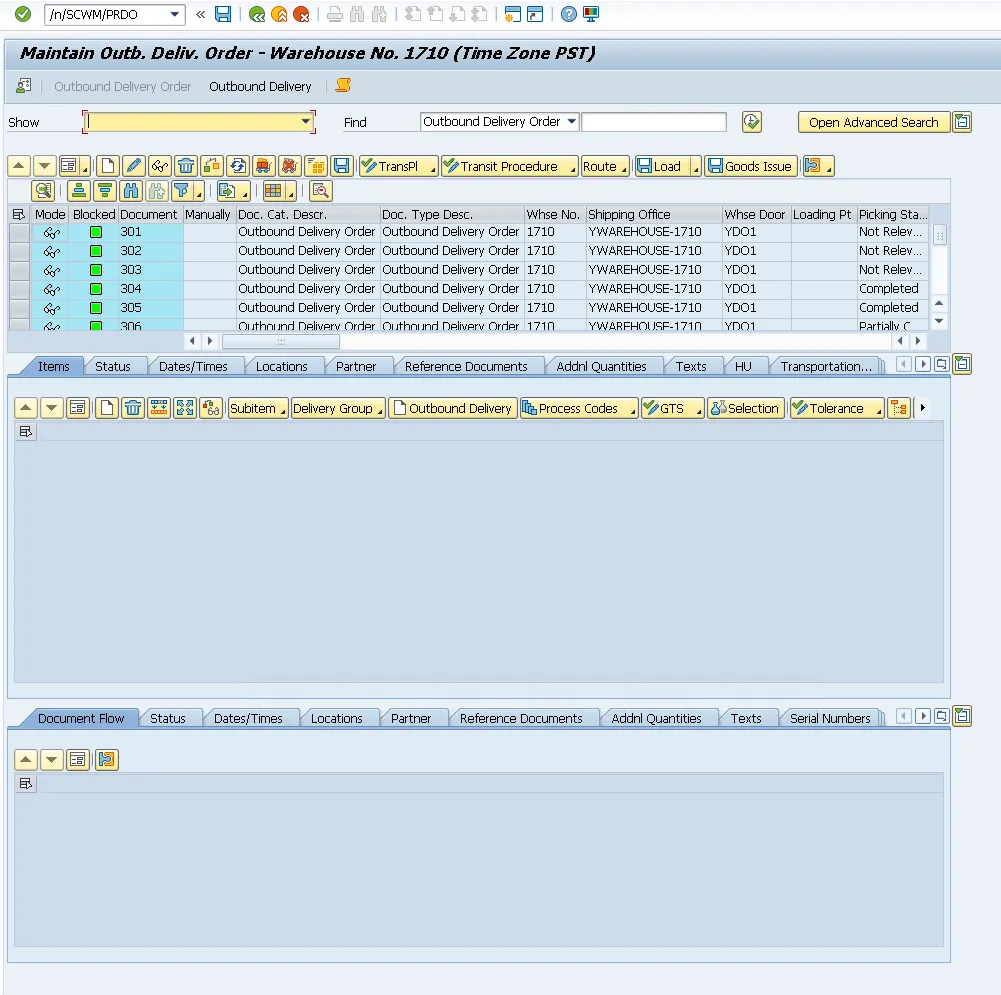
To populate the order list of our request, we query the delivery documents in our system and which items + quantities they contain. In the GUI, we can view detailed information for each ODO in /SCWM/PRDO.
General Material Data (MM03 / MARA)
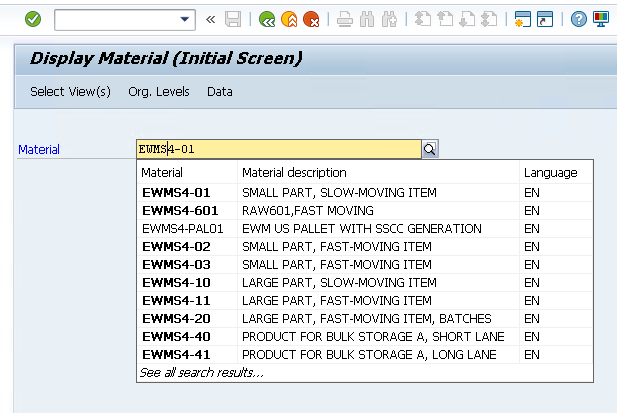
There's two ways to inspect the material master data (both for SKUs and packaging material / handling units). Either the MM03 transaction to inspect each material individually, or the MARA (or MARM more specifically) table through the table viewer (SE16)
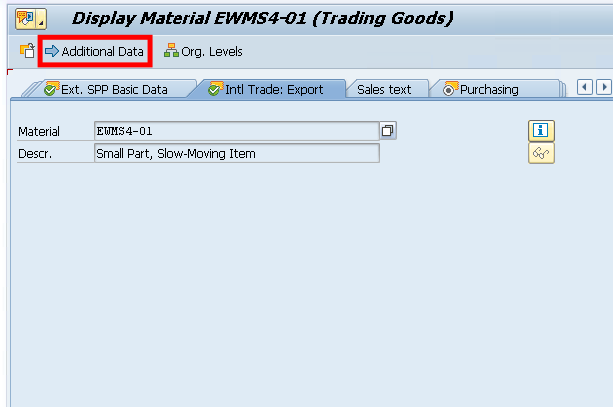
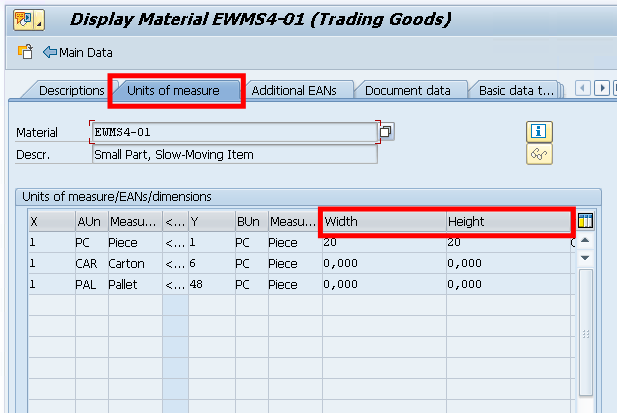
The most important, and mandatory information, are the dimensions of each product. These can be found in Additional Data > Units of Measure
To view all information in 1 table view, we can use the SE16 command and navigate to the MARA table.

Below is a view of both SKUs and HUs where the dimensions have been filled in for:
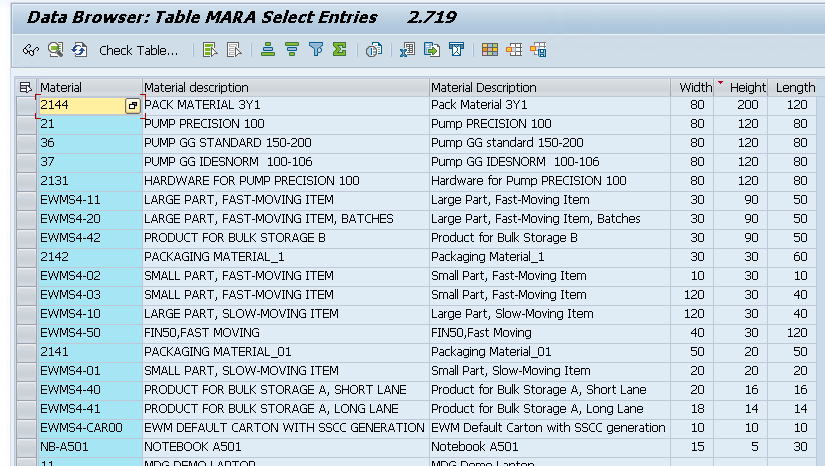
We can now write individual queries to get both the items of the ODOs in our system, as well as the different packaging types in which we can cartonize:
Querying the ordered items with dimensions
REPORT z_list_procio_item_dims.

"--- Result row (DOCNO instead of VBELN because we're in EWM)
TYPES: BEGIN OF ty_row,
         docno    TYPE /scdl/dl_docno_int,
         matnr    TYPE matnr,
         width    TYPE mara-breit,
         height   TYPE mara-hoehe,
         depth    TYPE mara-laeng,
         quantity TYPE p DECIMALS 3,
       END OF ty_row.
TYPES tt_row TYPE STANDARD TABLE OF ty_row WITH EMPTY KEY.

"--- Temp read from /SCDL/DB_PROCI_O
TYPES: BEGIN OF ty_pi,
         docno     TYPE /scdl/dl_docno_int,
         itemno    TYPE /scdl/dl_itemno,
         productno TYPE /scdl/dl_productno,
         qty       TYPE p DECIMALS 3,
       END OF ty_pi.
DATA lt_pi TYPE STANDARD TABLE OF ty_pi.

START-OF-SELECTION.

" 1) Read ODO items (warehouse 1710, doccat PDO)
SELECT docno, itemno, productno
  FROM /scdl/db_proci_o
  INTO TABLE @DATA(lt_raw)
  WHERE /scwm/whno = '1710'
    AND doccat     = 'PDO'.

IF lt_raw IS INITIAL.
  WRITE: / 'No /SCDL/DB_PROCI_O items for LGNUM 1710.'.
  LEAVE PROGRAM.
ENDIF.

" Resolve quantity via common field names (QTY, QTY_REQ, REQ_QTY, QREQ)
FIELD-SYMBOLS: <r> TYPE any, <q> TYPE any.
DATA ls_pi TYPE ty_pi.
LOOP AT lt_raw ASSIGNING <r>.
  CLEAR ls_pi.
  ASSIGN COMPONENT 'DOCNO'     OF STRUCTURE <r> TO FIELD-SYMBOL(<d>). IF sy-subrc = 0. ls_pi-docno     = <d>. ENDIF.
  ASSIGN COMPONENT 'ITEMNO'    OF STRUCTURE <r> TO FIELD-SYMBOL(<i>). IF sy-subrc = 0. ls_pi-itemno    = <i>. ENDIF.
  ASSIGN COMPONENT 'PRODUCTNO' OF STRUCTURE <r> TO FIELD-SYMBOL(<p>). IF sy-subrc = 0. ls_pi-productno = <p>. ENDIF.

  ASSIGN COMPONENT 'QTY'       OF STRUCTURE <r> TO <q>.
  IF sy-subrc <> 0. ASSIGN COMPONENT 'QTY_REQ' OF STRUCTURE <r> TO <q>. ENDIF.
  IF sy-subrc <> 0. ASSIGN COMPONENT 'REQ_QTY' OF STRUCTURE <r> TO <q>. ENDIF.
  IF sy-subrc <> 0. ASSIGN COMPONENT 'QREQ'    OF STRUCTURE <r> TO <q>. ENDIF.
  IF sy-subrc = 0. ls_pi-qty = <q>. ELSE. ls_pi-qty = 1. ENDIF.

  APPEND ls_pi TO lt_pi.
ENDLOOP.

" 2) Collect distinct MATNRs and read MARA dimensions (non-zero only)
TYPES: BEGIN OF ty_mkey, matnr TYPE matnr, END OF ty_mkey.
DATA lt_mkeys TYPE SORTED TABLE OF ty_mkey WITH UNIQUE KEY matnr.

FIELD-SYMBOLS <pi> LIKE LINE OF lt_pi.
LOOP AT lt_pi ASSIGNING <pi>.
  DATA lv_m TYPE matnr.
  lv_m = <pi>-productno.
  CALL FUNCTION 'CONVERSION_EXIT_ALPHA_INPUT'
    EXPORTING input  = lv_m
    IMPORTING output = lv_m.
  INSERT VALUE ty_mkey( matnr = lv_m ) INTO TABLE lt_mkeys.
ENDLOOP.

SELECT matnr, laeng, breit, hoehe
  FROM mara
  INTO TABLE @DATA(lt_mdim)
  FOR ALL ENTRIES IN @lt_mkeys
  WHERE matnr = @lt_mkeys-matnr
    AND laeng > 0 AND breit > 0 AND hoehe > 0.

" hashed map MATNR -> dims
TYPES: BEGIN OF ty_m2d,
         matnr TYPE matnr,
         laeng TYPE mara-laeng,
         breit TYPE mara-breit,
         hoehe TYPE mara-hoehe,
       END OF ty_m2d.
DATA lt_m2d TYPE HASHED TABLE OF ty_m2d WITH UNIQUE KEY matnr.

FIELD-SYMBOLS <md> LIKE LINE OF lt_mdim.
LOOP AT lt_mdim ASSIGNING <md>.
  INSERT VALUE ty_m2d( matnr = <md>-matnr
                       laeng = <md>-laeng
                       breit = <md>-breit
                       hoehe = <md>-hoehe ) INTO TABLE lt_m2d.
ENDLOOP.

" 3) Build result rows; drop items without maintained (non-zero) dims
DATA lt_rows TYPE tt_row.
FIELD-SYMBOLS <m2d> LIKE LINE OF lt_m2d.
DATA ls_row TYPE ty_row.

LOOP AT lt_pi ASSIGNING <pi>.
  DATA lv_m_int TYPE matnr.
  lv_m_int = <pi>-productno.
  CALL FUNCTION 'CONVERSION_EXIT_ALPHA_INPUT'
    EXPORTING input  = lv_m_int
    IMPORTING output = lv_m_int.

  READ TABLE lt_m2d ASSIGNING <m2d> WITH TABLE KEY matnr = lv_m_int.
  IF sy-subrc <> 0.
    CONTINUE.
  ENDIF.

  CLEAR ls_row.
  ls_row-docno    = <pi>-docno.
  ls_row-quantity = <pi>-qty.
  ls_row-width    = <m2d>-breit.
  ls_row-height   = <m2d>-hoehe.
  ls_row-depth    = <m2d>-laeng.

  " pretty MATNR for display
  ls_row-matnr = lv_m_int.
  CALL FUNCTION 'CONVERSION_EXIT_ALPHA_OUTPUT'
    EXPORTING input  = ls_row-matnr
    IMPORTING output = ls_row-matnr.

  APPEND ls_row TO lt_rows.
ENDLOOP.

cl_demo_output=>display( lt_rows ).
Querying the packaging types with dimensions
REPORT z_list_hu_bins_min.

" Output: VERP material id + maintained dims (non-zero only)
TYPES: BEGIN OF ty_bin,
         id     TYPE matnr,
         width  TYPE mara-breit,
         height TYPE mara-hoehe,
         depth  TYPE mara-laeng,
       END OF ty_bin.
DATA lt_bins TYPE STANDARD TABLE OF ty_bin WITH EMPTY KEY.

" Read VERP materials where all three dims are maintained (>0)
SELECT matnr AS id,
       breit AS width,
       hoehe AS height,
       laeng AS depth
  FROM mara
  INTO TABLE @lt_bins
  WHERE mtart = 'VERP'
    AND laeng > 0 AND breit > 0 AND hoehe > 0.

" Optional: show MATNR in external format
FIELD-SYMBOLS <b> LIKE LINE OF lt_bins.
LOOP AT lt_bins ASSIGNING <b>.
  CALL FUNCTION 'CONVERSION_EXIT_ALPHA_OUTPUT'
    EXPORTING input  = <b>-id
    IMPORTING output = <b>-id.
ENDLOOP.

IF lt_bins IS INITIAL.
  WRITE: / 'No VERP materials with non-zero dimensions found.'.
  LEAVE PROGRAM.
ENDIF.

cl_demo_output=>display( lt_bins ).

Setting up a connection with OptiPack
We need to allow our SAP system to make a connection the OptiPack API. This can be configured in STRUST and SM59. For this, we need to download the Certificate of our OptiPack API to upload it here. The instructions are very similar to how a connection to our OptiPick API has to be set up, so the screenshots below are focused on that. The certificate can be downloaded from the browser (https://optiapp.api.optioryx.com). Below are screenshots to do it in Google Chrome:
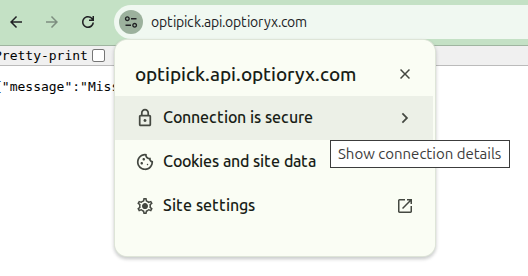
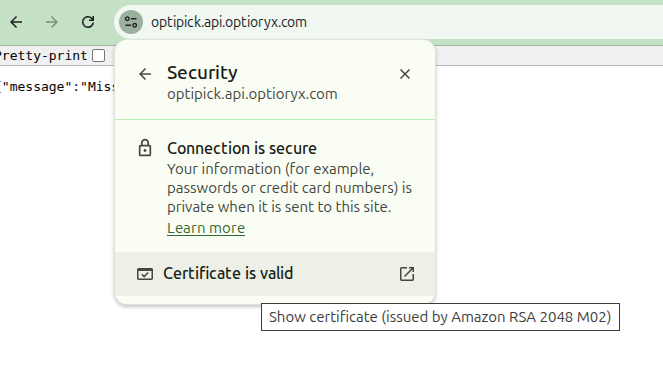
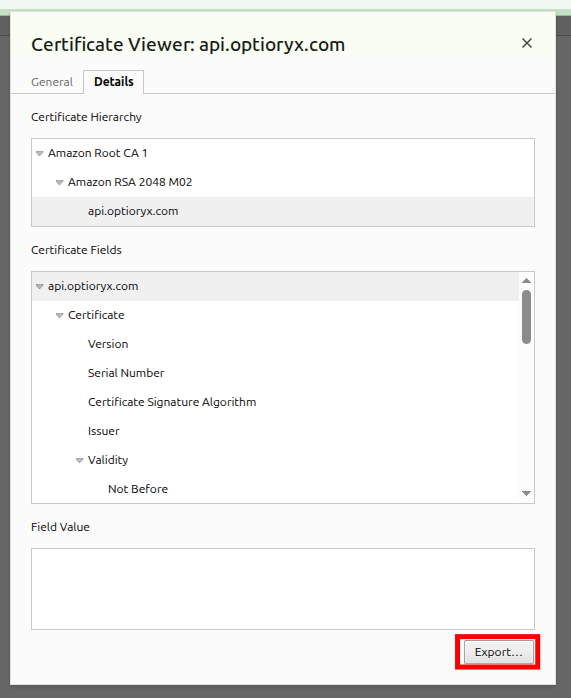
Most export formats will work, so choose your favourite. Afterwards, go to STRUST in SAP and upload the certificate here. You should see it added in the Certificate List (middle panel).
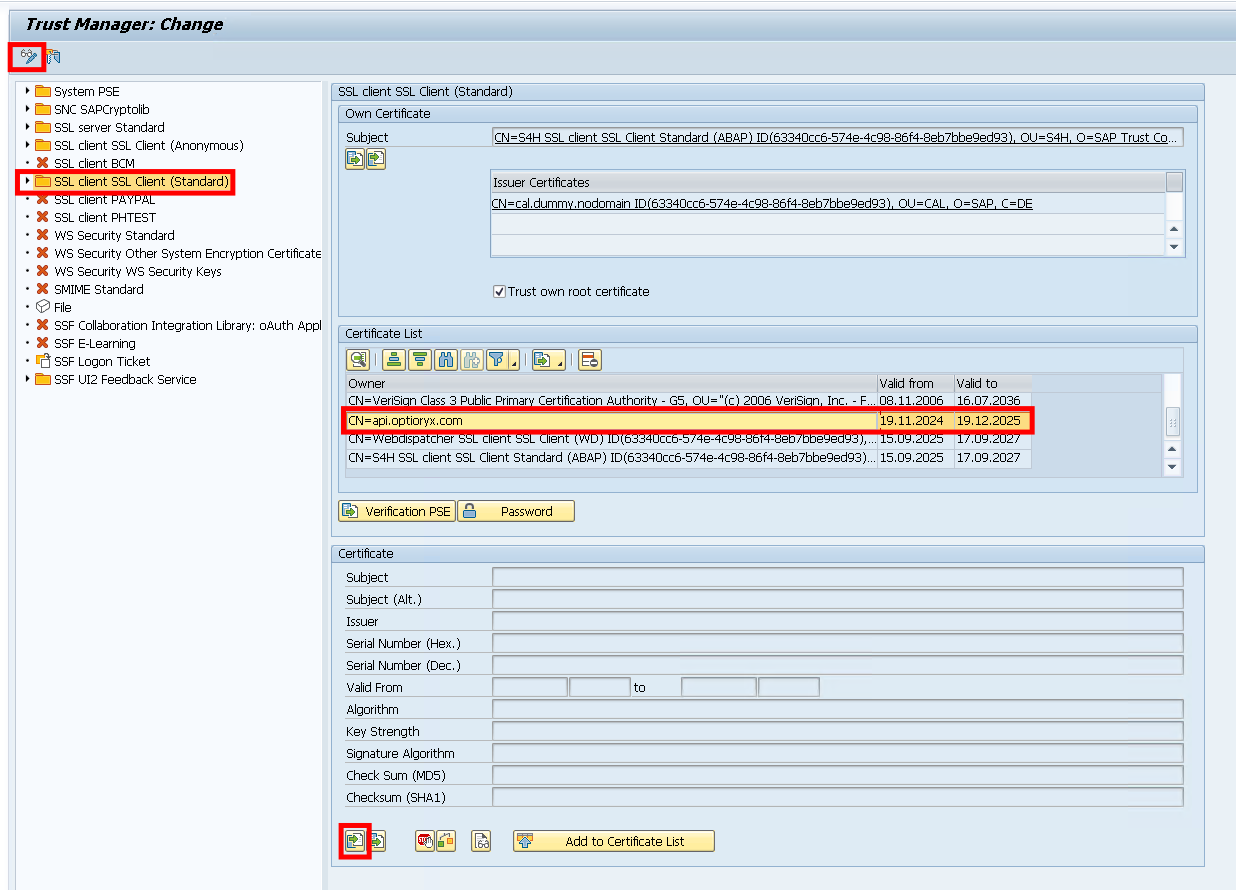
After adding the certificate, we add an extra connection using SM59.
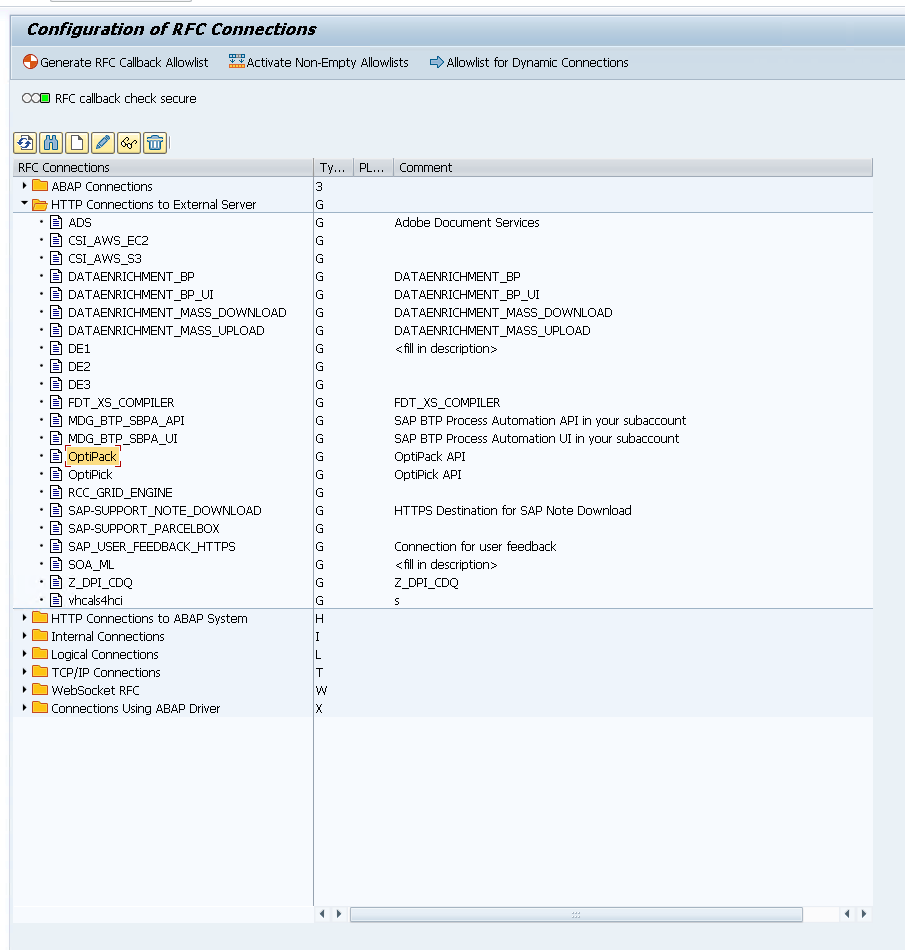
In here, create a new "HTTP Connection to External Server". Then fill in the following information in the "Technical Settings" and "Logon & Security" tabs.
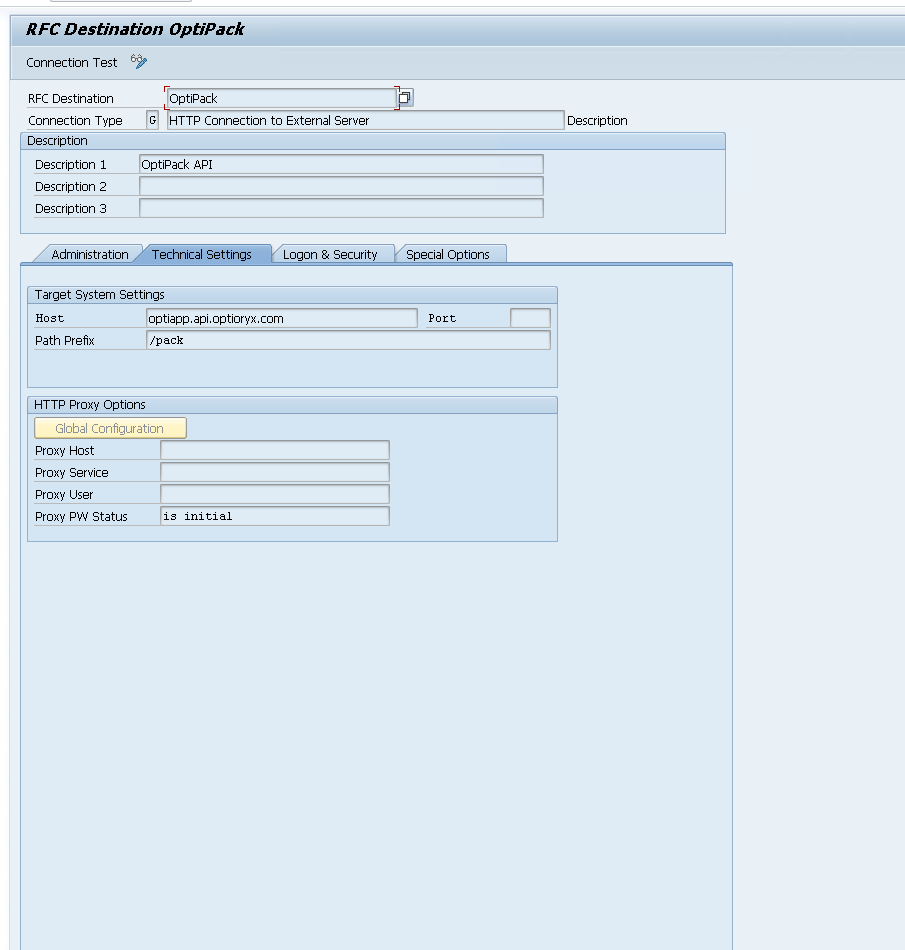
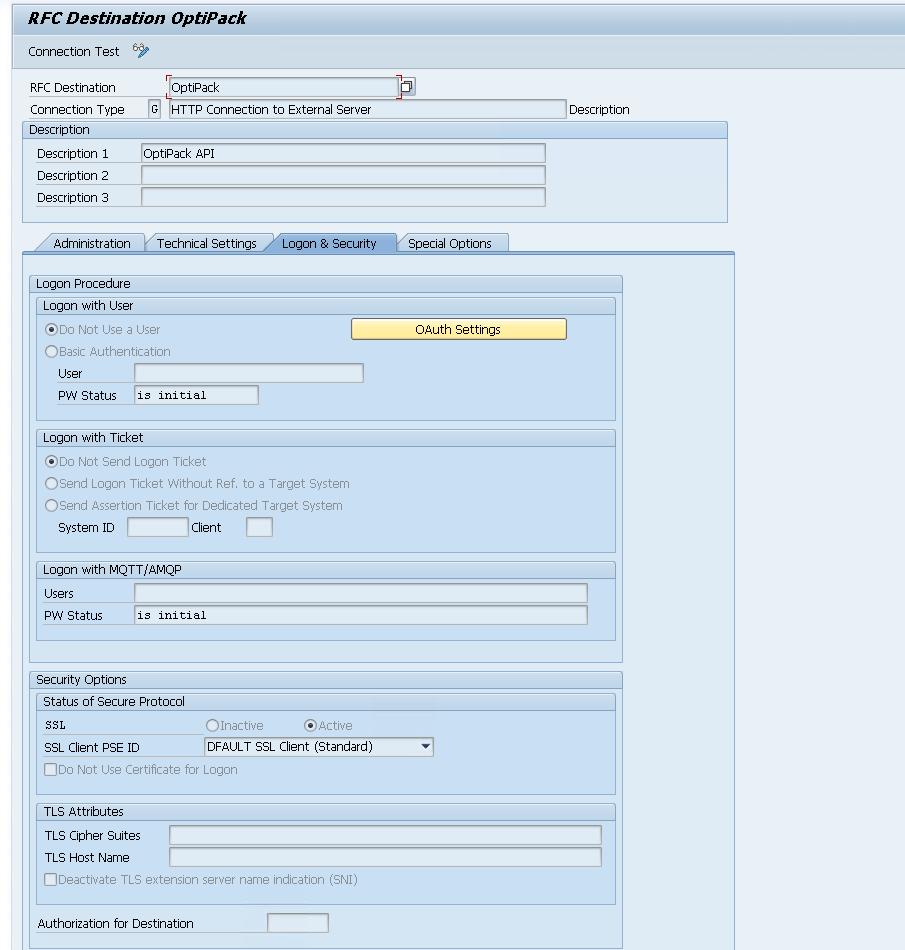
When configured, you can run a "Connection Test" from here:
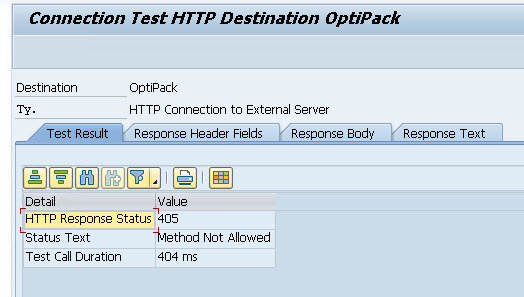
We get Error 405 from our API, but this makes sense as the Connection Test just sends a simple GET request (while our API expects a POST). This confirms our connection works! Within ABAP we can use this with the http_client as follows:
DATA: lo_http      TYPE REF TO if_http_client.

cl_http_client=>create_by_destination(
  EXPORTING destination = 'OptiPack'
  IMPORTING client      = lo_http ).
ABAP script to generate request and visualise
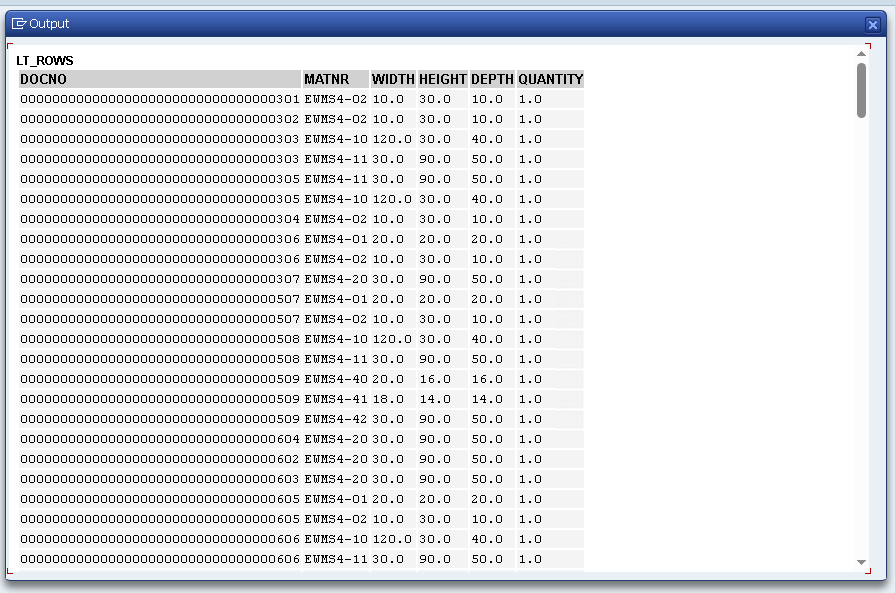
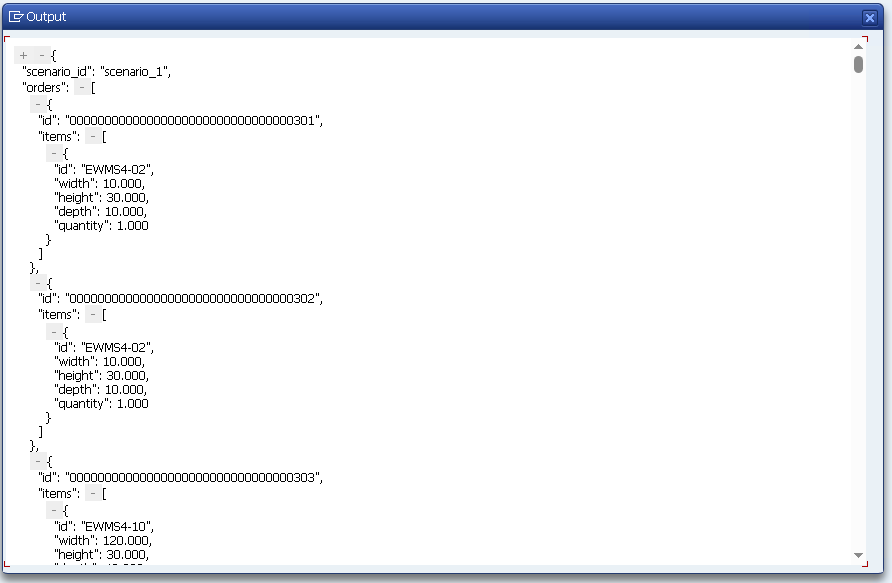
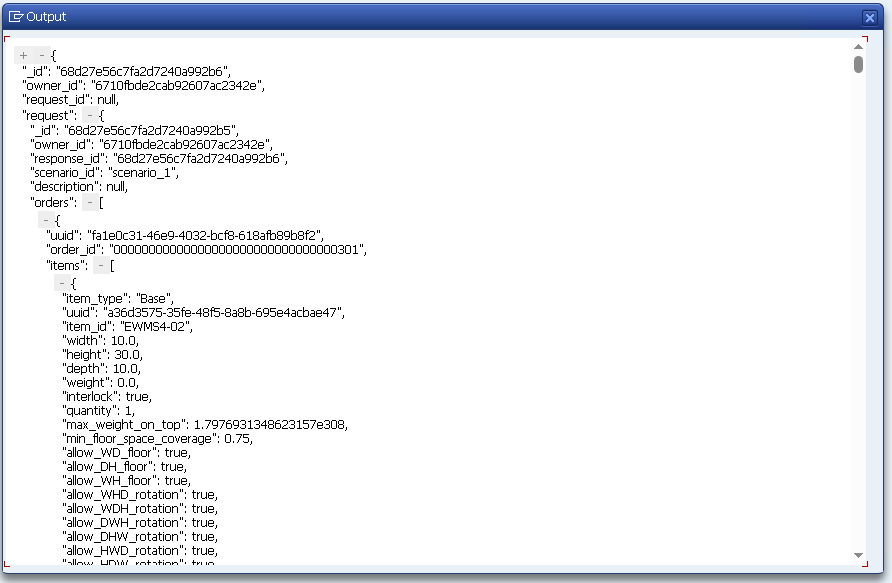
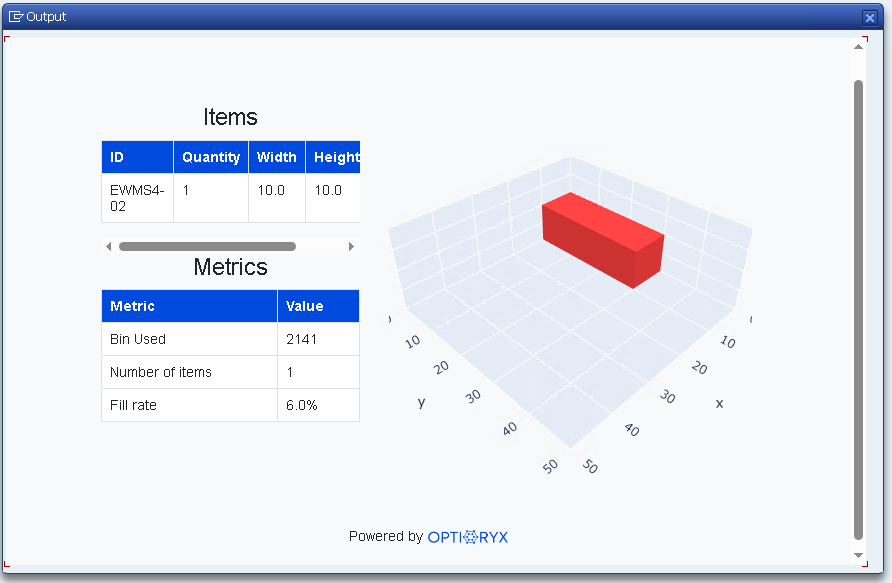
We now have all necessary information to send a first request to the OptiPack API. We first query the ODOs with their items and quantities, we then join this with the MARA table to get the necessary dimension information. We filter away order lines where one or more of the dimensions are undefined or equal to 0. Afterwards, we get the packaging materials (type = VERP). We then construct the JSON to send to our API. In the end, we first visualise the response in JSON format that we get back from the API. After that, we also take the first order from the response to call a second endpoint that returns a HTML with an interactive visualisation of that order.
REPORT zopti_pack_call_procio.

"=============================
" tiny JSON helper
"=============================
CLASS lcl_json DEFINITION FINAL.
  PUBLIC SECTION.
    CLASS-METHODS ser IMPORTING data TYPE any RETURNING VALUE(json) TYPE string.
ENDCLASS.
CLASS lcl_json IMPLEMENTATION.
  METHOD ser.
    json = /ui2/cl_json=>serialize(
             data        = data
             pretty_name = /ui2/cl_json=>pretty_mode-low_case ).
  ENDMETHOD.
ENDCLASS.

"=============================
" parameter(s)
"=============================
PARAMETERS: p_apkey TYPE string LOWER CASE OBLIGATORY
              DEFAULT '<CENSORED>'.

"=============================
" simple types for payload
"=============================
TYPES: BEGIN OF ty_item_json,
         id       TYPE string,
         width    TYPE p DECIMALS 3,
         height   TYPE p DECIMALS 3,
         depth    TYPE p DECIMALS 3,
         quantity TYPE p DECIMALS 3,
       END OF ty_item_json.
TYPES tt_item_json TYPE STANDARD TABLE OF ty_item_json WITH EMPTY KEY.

TYPES: BEGIN OF ty_order_json,
         id    TYPE string,
         items TYPE tt_item_json,
       END OF ty_order_json.
TYPES tt_order_json TYPE STANDARD TABLE OF ty_order_json WITH EMPTY KEY.

TYPES: BEGIN OF ty_bin_json,
         id     TYPE string,
         width  TYPE p DECIMALS 3,
         height TYPE p DECIMALS 3,
         depth  TYPE p DECIMALS 3,
       END OF ty_bin_json.
TYPES tt_bin_json TYPE STANDARD TABLE OF ty_bin_json WITH EMPTY KEY.

TYPES: BEGIN OF ty_payload,
         scenario_id TYPE string,
         orders      TYPE tt_order_json,
         bins        TYPE tt_bin_json,
       END OF ty_payload.

"=============================
" 1) Read ODO items from /SCDL/DB_PROCI_O
"=============================
TYPES: BEGIN OF ty_proci_min,
         docno     TYPE /scdl/dl_docno_int,   " internal ODO number
         itemno    TYPE /scdl/dl_itemno,      " item number
         productno TYPE /scdl/dl_productno,   " material
         qty       TYPE p DECIMALS 3,         " best-effort quantity
       END OF ty_proci_min.
DATA lt_proci TYPE STANDARD TABLE OF ty_proci_min.

START-OF-SELECTION.

" Raw read (without qty yet)
SELECT docno, itemno, productno
  FROM /scdl/db_proci_o
  INTO TABLE @DATA(lt_raw)
  WHERE /scwm/whno = '1710'
    AND doccat     = 'PDO'.

IF lt_raw IS INITIAL.
  WRITE: / 'No /SCDL/DB_PROCI_O items for LGNUM 1710.'.
  LEAVE PROGRAM.
ENDIF.

" Copy + resolve quantity via dynamic component names (QTY variants)
FIELD-SYMBOLS: <r>  TYPE any,
               <q>  TYPE any.
DATA ls_min TYPE ty_proci_min.

LOOP AT lt_raw ASSIGNING <r>.
  CLEAR: ls_min, ls_min-qty.
  ASSIGN COMPONENT 'DOCNO'     OF STRUCTURE <r> TO FIELD-SYMBOL(<d>). IF sy-subrc = 0. ls_min-docno     = <d>. ENDIF.
  ASSIGN COMPONENT 'ITEMNO'    OF STRUCTURE <r> TO FIELD-SYMBOL(<i>). IF sy-subrc = 0. ls_min-itemno    = <i>. ENDIF.
  ASSIGN COMPONENT 'PRODUCTNO' OF STRUCTURE <r> TO FIELD-SYMBOL(<p>). IF sy-subrc = 0. ls_min-productno = <p>. ENDIF.

  " try common quantity field names:
  IF sy-subrc = 0.
    ASSIGN COMPONENT 'QTY'       OF STRUCTURE <r> TO <q>.
    IF sy-subrc <> 0. ASSIGN COMPONENT 'QTY_REQ' OF STRUCTURE <r> TO <q>. ENDIF.
    IF sy-subrc <> 0. ASSIGN COMPONENT 'REQ_QTY' OF STRUCTURE <r> TO <q>. ENDIF.
    IF sy-subrc <> 0. ASSIGN COMPONENT 'QREQ'    OF STRUCTURE <r> TO <q>. ENDIF.

    IF sy-subrc = 0.
      ls_min-qty = <q>.
    ELSE.
      ls_min-qty = 1. " fallback so we always have something
    ENDIF.
  ENDIF.

  APPEND ls_min TO lt_proci.
ENDLOOP.

"=============================
" 2) Read MARA dimensions (non-zero only) for those materials
"=============================
TYPES: BEGIN OF ty_m2d,
         matnr TYPE matnr,
         laeng TYPE mara-laeng,
         breit TYPE mara-breit,
         hoehe TYPE mara-hoehe,
       END OF ty_m2d.
DATA lt_m2d TYPE HASHED TABLE OF ty_m2d WITH UNIQUE KEY matnr.

" collect distinct MATNR (internal)
TYPES: BEGIN OF ty_mkey, matnr TYPE matnr, END OF ty_mkey.
DATA lt_mkeys TYPE SORTED TABLE OF ty_mkey WITH UNIQUE KEY matnr.

FIELD-SYMBOLS <x> LIKE LINE OF lt_proci.
LOOP AT lt_proci ASSIGNING <x>.
  DATA lv_m_int TYPE matnr.
  lv_m_int = <x>-productno.
  CALL FUNCTION 'CONVERSION_EXIT_ALPHA_INPUT'
    EXPORTING input  = lv_m_int
    IMPORTING output = lv_m_int.
  INSERT VALUE ty_mkey( matnr = lv_m_int ) INTO TABLE lt_mkeys.
ENDLOOP.

IF lt_mkeys IS INITIAL.
  WRITE: / 'No materials to read in MARA.'.
  LEAVE PROGRAM.
ENDIF.

SELECT matnr, laeng, breit, hoehe
  FROM mara
  INTO TABLE @DATA(lt_mara)
  FOR ALL ENTRIES IN @lt_mkeys
  WHERE matnr = @lt_mkeys-matnr
    AND laeng > 0 AND breit > 0 AND hoehe > 0.

FIELD-SYMBOLS <mrow> LIKE LINE OF lt_mara.
LOOP AT lt_mara ASSIGNING <mrow>.
  INSERT VALUE ty_m2d(
           matnr = <mrow>-matnr
           laeng = <mrow>-laeng
           breit = <mrow>-breit
           hoehe = <mrow>-hoehe ) INTO TABLE lt_m2d.
ENDLOOP.

"=============================
" 3) Keep only items whose material has non-zero dims, aggregate per DOCNO+MATNR
"=============================
TYPES: BEGIN OF ty_agg_row,
         docno TYPE /scdl/dl_docno_int,
         matnr TYPE matnr,
         qty   TYPE p DECIMALS 3,
       END OF ty_agg_row.
DATA lt_agg TYPE HASHED TABLE OF ty_agg_row WITH UNIQUE KEY docno matnr.

FIELD-SYMBOLS: <a> LIKE LINE OF lt_agg.

LOOP AT lt_proci ASSIGNING <x>.
  DATA lv_m_int2 TYPE matnr.
  lv_m_int2 = <x>-productno.
  CALL FUNCTION 'CONVERSION_EXIT_ALPHA_INPUT'
    EXPORTING input  = lv_m_int2
    IMPORTING output = lv_m_int2.

  " keep only if we have dims
  READ TABLE lt_m2d WITH TABLE KEY matnr = lv_m_int2 TRANSPORTING NO FIELDS.
  IF sy-subrc <> 0.
    CONTINUE.
  ENDIF.

  READ TABLE lt_agg ASSIGNING <a> WITH TABLE KEY docno = <x>-docno matnr = lv_m_int2.
  IF sy-subrc = 0.
    <a>-qty = <a>-qty + <x>-qty.
  ELSE.
    INSERT VALUE ty_agg_row( docno = <x>-docno matnr = lv_m_int2 qty = <x>-qty ) INTO TABLE lt_agg.
  ENDIF.
ENDLOOP.

IF lt_agg IS INITIAL.
  WRITE: / 'Nothing to send (no PROCI_O items with non-zero dimensions).'.
  LEAVE PROGRAM.
ENDIF.

"=============================
" 4) Build orders[] from lt_agg  (order id = DOCNO pretty-printed)
"=============================
DATA lt_orders TYPE tt_order_json.
DATA lt_items  TYPE tt_item_json.
DATA ls_order  TYPE ty_order_json.
DATA ls_item   TYPE ty_item_json.

" collect distinct DOCNO
TYPES: BEGIN OF ty_dkey, docno TYPE /scdl/dl_docno_int, END OF ty_dkey.
DATA lt_docnos TYPE SORTED TABLE OF ty_dkey WITH UNIQUE KEY docno.

FIELD-SYMBOLS <ar> LIKE LINE OF lt_agg.
LOOP AT lt_agg ASSIGNING <ar>.
  INSERT VALUE ty_dkey( docno = <ar>-docno ) INTO TABLE lt_docnos.
ENDLOOP.

FIELD-SYMBOLS: <dk>  LIKE LINE OF lt_docnos,
               <m2d> LIKE LINE OF lt_m2d.

LOOP AT lt_docnos ASSIGNING <dk>.
  CLEAR lt_items.
  LOOP AT lt_agg ASSIGNING <ar> WHERE docno = <dk>-docno.
    READ TABLE lt_m2d ASSIGNING <m2d> WITH TABLE KEY matnr = <ar>-matnr.
    IF sy-subrc <> 0. CONTINUE. ENDIF.

    CLEAR ls_item.
    ls_item-quantity = <ar>-qty.
    ls_item-width    = <m2d>-breit.
    ls_item-height   = <m2d>-hoehe.
    ls_item-depth    = <m2d>-laeng.

    DATA lv_m_out TYPE matnr. lv_m_out = <ar>-matnr.
    CALL FUNCTION 'CONVERSION_EXIT_ALPHA_OUTPUT'
      EXPORTING input  = lv_m_out
      IMPORTING output = lv_m_out.
    ls_item-id = lv_m_out.

    APPEND ls_item TO lt_items.
  ENDLOOP.

  IF lt_items IS INITIAL.
    CONTINUE.
  ENDIF.

  " DOCNO is an internal number; still use as order id (string)
  CLEAR ls_order.
  ls_order-id    = |{ <dk>-docno }|.
  ls_order-items = lt_items.
  APPEND ls_order TO lt_orders.
ENDLOOP.

"=============================
" 5) Bins = HU types (VERP) with non-zero dims
"=============================
DATA lt_bins TYPE tt_bin_json.
SELECT matnr AS id, breit AS width, hoehe AS height, laeng AS depth
  FROM mara
  INTO TABLE @lt_bins
  WHERE mtart = 'VERP'
    AND laeng > 0 AND breit > 0 AND hoehe > 0.

FIELD-SYMBOLS <b> LIKE LINE OF lt_bins.
LOOP AT lt_bins ASSIGNING <b>.
  CALL FUNCTION 'CONVERSION_EXIT_ALPHA_OUTPUT'
    EXPORTING input  = <b>-id
    IMPORTING output = <b>-id.
ENDLOOP.

IF lt_bins IS INITIAL.
  WRITE: / 'No VERP bins with non-zero dimensions.'.
  LEAVE PROGRAM.
ENDIF.

"=============================
" 6) Build payload and POST to OptiPack
"=============================
DATA ls_payload TYPE ty_payload.
ls_payload-scenario_id = 'scenario_1'.
ls_payload-orders      = lt_orders.
ls_payload-bins        = lt_bins.

DATA lv_json_req TYPE string.
lv_json_req = lcl_json=>ser( ls_payload ).

DATA lo_http TYPE REF TO if_http_client.
cl_http_client=>create_by_destination(
  EXPORTING destination = 'OptiPack'
  IMPORTING client      = lo_http ).

lo_http->request->set_method( 'POST' ).
lo_http->request->set_header_field( name = 'Content-Type' value = 'application/json' ).
lo_http->request->set_header_field( name = 'accept'       value = 'application/json' ).
lo_http->request->set_header_field( name = 'x-api-key'    value = p_apkey ).
lo_http->request->set_cdata( lv_json_req ).

lo_http->send( ).
lo_http->receive( ).

DATA lv_status   TYPE i.
DATA lv_reason   TYPE string.
DATA lv_json_res TYPE string.

lo_http->response->get_status( IMPORTING code = lv_status reason = lv_reason ).
lv_json_res = lo_http->response->get_cdata( ).

" Pretty-print request & response
CALL TRANSFORMATION sjson2html
  SOURCE XML lv_json_req
  RESULT XML DATA(html_req).
cl_demo_output=>display_html( cl_abap_codepage=>convert_from( html_req ) ).

CALL TRANSFORMATION sjson2html
  SOURCE XML lv_json_res
  RESULT XML DATA(html_res).
cl_demo_output=>display_html( cl_abap_codepage=>convert_from( html_res ) ).

lo_http->close( ).

"=============================
" 7) Extract _id and open interactive visualization
"=============================
DATA lv_scn_id TYPE string.

TYPES: BEGIN OF ty_pack_res, _id TYPE string, END OF ty_pack_res.
DATA ls_pack_res TYPE ty_pack_res.

TRY.
    /ui2/cl_json=>deserialize(
      EXPORTING json = lv_json_res
      CHANGING  data = ls_pack_res ).
    lv_scn_id = ls_pack_res-_id.
  CATCH cx_root.
    CLEAR lv_scn_id.
ENDTRY.

IF lv_scn_id IS INITIAL.
  FIND REGEX '"_id"\s*:\s*"([A-Za-z0-9]+)"' IN lv_json_res SUBMATCHES lv_scn_id.
ENDIF.

IF lv_scn_id IS INITIAL.
  WRITE: / 'No _id found in OptiPack response – cannot open visualization.'.
  RETURN.
ENDIF.

DATA lv_url  TYPE string.
DATA lv_html TYPE string.
DATA lo_vis  TYPE REF TO if_http_client.

lv_url = |https://optiapp.api.optioryx.com/visualisation/interactive/{ lv_scn_id }/0/0?offline=false|.

cl_http_client=>create_by_url(
  EXPORTING url    = lv_url
  IMPORTING client = lo_vis ).

lo_vis->request->set_method( 'GET' ).
lo_vis->request->set_header_field( name = 'accept'    value = 'text/html' ).
lo_vis->request->set_header_field( name = 'x-api-key' value = p_apkey ).

lo_vis->send( ).
lo_vis->receive( ).

lv_html = lo_vis->response->get_cdata( ).
lo_vis->close( ).

cl_demo_output=>display_html( lv_html ).
The results of executing this script:

Field mapping (recap)
| OptiPack JSON | SAP EWM source |
|---|---|
orders[].id | DOCNO from /SCDL/DB_PROCI_O (or ERP VBELN via /SCDL/DB_PROCH_O) |
orders[].items[].id | PRODUCTNO (pretty-printed MATNR) |
orders[].items[].quantity | QTY or QTY_REQ / REQ_QTY / QREQ in /SCDL/DB_PROCI_O |
items[].width/height/depth | MARM preferred, fallback MARA |
bins[].id | MATNR of packaging material (VERP) |
bins[].width/height/depth | MARM (preferred) or MARA of packaging material |
Where to call OptiPack in SAP EWM?
PPF Action on ODO (recommended)
Trigger after WT creation (e.g., at wave release / ODO status). Run OptiPack; if success → store plan; if fail → use SAP CAP/standard. Easy to make idempotent.
Work Center (Packing)
User click → call OptiPack and propose HU assignment interactively.
Background job
Periodic job that picks up ready ODOs, posts plans in batches.
Fallback strategy: always have SAP CAP/standard precomputed but not persisted; persist only if OptiPack fails or is disabled. This keeps the integration non-intrusive.
Setup checklist
- Master data: make sure SKUs and Packaging (
VERP) materials have Length/Width/Height maintained (preferably inMARM). - Warehouse filters:
/SCWM/WHNO,DOCCATmatch target scope. - Connectivity:
STRUSTSSL chain;SM59destination; proxy/egress allowlist. - Authorizations: program runs with access to
/SCDL/*,MARA/MARM,STRUST,SM59. - Feature toggle: TVARVC (Z_OPTIPACK_ENABLED) or similar.
Additional Tips & Tricks
Units & conversions (important)
- Prefer
MARM, normalize to a single unit (e.g., CM). - Document orientation mapping:
LAENG → depth,BREIT → width,HOEHE → height(as in examples). - If you adopt
MARM, convert withMD_CONVERT_MATERIAL_UNITor material UoM conversion logic.
Error handling & monitoring
- Wrap HTTP with timeouts; for 429/5xx do retry with backoff.
- Write to Application Log (SLG1) using CL_BAL_LOG (store ODO id(s), request hash, HTTP code, _id).
- Keep calls idempotent: use scenario_id + upsert=true.
Security
- Do not hardcode API keys. Store in SSFS or a protected Z-table; restrict maintenance via auth objects.
- Ensure outbound proxy/firewall allowlist for optiapp.api.optioryx.com.
Performance & scaling
- One API call per order scales much better than bundling orders in a single call.
- Use FOR ALL ENTRIES reads (as you do) and normalize MATNR once.
- For very large volumes, consider a CDS view joining
PROCI_O→MARM/MARAso HANA can push down filters.
Result application (if persisting the plan)
- Persist as PSHU or shipping HUs on the ODO; create VEPO assignments accordingly.
- In pick-to-cart flows, you can stamp pick-HUs and then consolidate to ship-HUs per the OptiPack plan.
Governance & transports
STRUST/SM59+ Z-programs go via DEV→QAS→PRD transports.- Gate rollout with the feature toggle per warehouse.