Communicating with the Pulse Pack API
Every packing request is sent the same way: a POST to /pack or /pack_pallet with your orders and bins in the body and your key in the x-api-key header. What differs is how you get the result back. Pulse Pack supports two modes:
- Synchronous (the default): the packed result comes back in the same HTTP response.
- Asynchronous: the request is queued, computed in the background, and you collect the result later, by polling or via a callback.
If you have used our Flux or Pulse Pick APIs, note that Pulse Pack's asynchronous mode is deliberately more barebones: there is no svix, no webhook subscriptions, and no signing secrets to configure. You flip one query parameter and then either poll an endpoint or hand us a URL to post the answer to.
Synchronous communication (the default)
synchronous defaults to true, so a plain request blocks until packing is done and returns the full response body with 200 OK. This is the simplest thing to integrate and is the right choice for interactive, single-order requests. (The asynchronous path instead returns 202 Accepted, since its result is not ready yet.)
curl -X POST 'https://optiapp.api.optioryx.com/pack' \
  -H 'x-api-key: <API_KEY>' \
  -d '{ "orders": [ ... ], "bins": [ ... ] }'
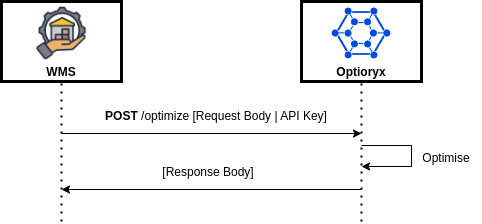
The client posts a request and blocks until Optioryx returns the packed response. Read /optimize in the diagram as /pack (or /pack_pallet) for Pulse Pack.
The catch is time. A synchronous request stays open for at most two minutes. If packing runs longer than that, the request fails with a timeout error and returns no result. Cartonising large multi-order batches, box-on-demand right-sizing, or carrier-cost optimisation over a big preset catalogue can all push past that limit, so for heavy requests, switch to asynchronous.
Asynchronous communication
Set ?synchronous=false on the POST. Instead of blocking, the API accepts the request, starts packing in the background, and immediately returns 202 Accepted with a small JSON body. The only field you need from it is the top-level _id, the handle for this response. A background job may run for up to fifteen minutes, so this mode suits heavy requests that would exceed the two-minute synchronous limit.
curl -X POST 'https://optiapp.api.optioryx.com/pack?synchronous=false' \
  -H 'x-api-key: <API_KEY>' \
  -d '{ "orders": [ ... ], "bins": [ ... ] }'
{
  "_id": "665f1e2a9c8c3e4dc7625abc",
  "status": "created"
}
From here you have two ways to collect the finished result: poll for it, or let us call you back. The sequence diagram below shows both: polling on the left, a callback on the right.
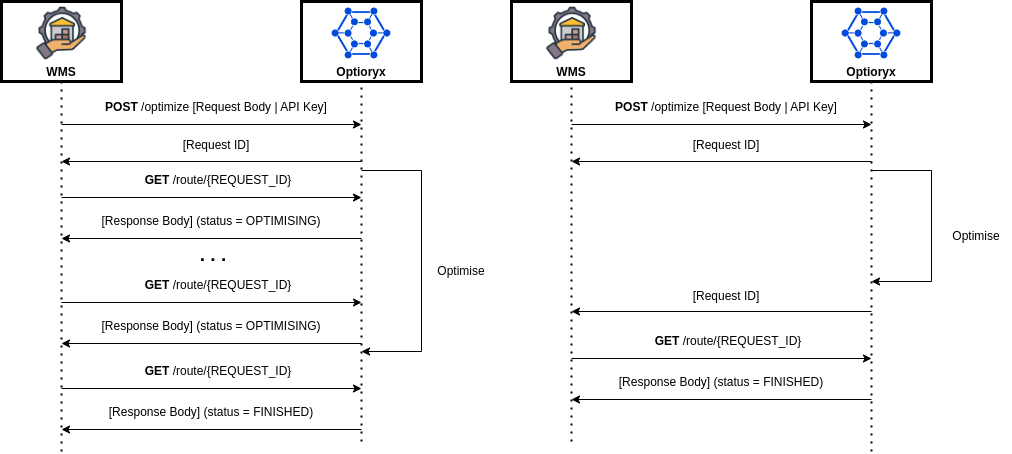
Illustrative. The diagram uses OptiRoute's /optimize and /route/{REQUEST_ID} endpoints. For Pulse Pack, read POST /optimize as POST /pack?synchronous=false, the returned "Request ID" as the response _id, GET /route/{REQUEST_ID} as GET /responses/{id}, and status = OPTIMISING / FINISHED as Pulse Pack's busy / finished. On the callback (right) side, Pulse Pack posts the full response body to your URL, so no follow-up GET is required.
The response lifecycle
An asynchronous response moves through a set of status values. Only two of them are outcomes you wait for:
status | Meaning |
|---|---|
created | The response exists; packing has not started yet. |
awaiting_bins | An intermediate in-progress state. |
busy | Packing is in progress. |
finished | Done. The full result (packed orders and bins, costs, fill rate, execution_time) is populated. |
error | Packing failed. Inspect errors and messages for the cause. |
deleted | The response has been deleted and is no longer retrievable. |
created, awaiting_bins, and busy all mean "not ready yet". finished and error are the two terminal states.
Option A: Polling
Take the _id from the 202 response and GET /responses/{id} until status is finished (or error). While the request is still running you get the same document back with an in-progress status and no packed result yet.
curl -X GET 'https://optiapp.api.optioryx.com/responses/665f1e2a9c8c3e4dc7625abc' \
  -H 'x-api-key: <API_KEY>'
{
  "_id": "665f1e2a9c8c3e4dc7625abc",
  "status": "finished",
  "orders": [ ... ],
  "execution_time": 4.12,
  "errors": [],
  "messages": []
}
Poll on a sensible interval rather than in a tight loop. Start around one request every second or two and back off for longer jobs. A GET for an unknown _id returns 404. See the Read Response reference for the full response schema.
Option B: Callback URL
If you would rather not poll, pass a callback_url on the POST. When packing finishes, we send a POST to that URL with the complete response body, exactly what GET /responses/{id} would have returned. You still get the 202 with the _id up front, so you can correlate the callback with the request that triggered it.
curl -X POST 'https://optiapp.api.optioryx.com/pack?synchronous=false&callback_url=https%3A%2F%2Fyour-app.example.com%2Foptipack%2Fcallback' \
  -H 'x-api-key: <API_KEY>' \
  -d '{ "orders": [ ... ], "bins": [ ... ] }'
Your endpoint must be publicly reachable over HTTPS and should acknowledge quickly with a 2xx. Because the URL is itself a query parameter, remember to URL-encode it when embedding it in the request URL (as above).
Unlike the svix-backed webhooks in Flux and Pulse Pick, this callback is a single direct POST. It does not come with svix's signed payloads, delivery dashboard, or managed retries. Two practical consequences:
- Authenticate it yourself. Put an unguessable secret token in the
callback_url(e.g..../callback?token=...) and reject any call that doesn't carry it. - Keep polling as a safety net. If a callback is ever missed, the result is still durably available at
GET /responses/{id}. Persist the_idand treat the callback as an optimisation, not the only path to the answer.
Polling or callback?
- Poll when your integration can't accept inbound HTTP (behind a firewall, a batch job, a desktop client) or when you want the simplest possible control flow.
- Use a callback when you have a reachable HTTPS endpoint and want to avoid the latency and request overhead of polling. You are told the moment packing finishes.
You can also combine them: register a callback_url for the fast path, and fall back to polling GET /responses/{id} if the callback doesn't arrive within your expected window.
Reusing the response _id
The _id is durable and is the same handle used elsewhere in the API. Once a response is finished you can fetch it again at any time with GET /responses/{id}, and you can feed the same _id into the visualisation endpoints to render a packed bin (see the getting-started guide). Each packed bin in the response also carries a ready-made interactive_viz_url.
When something goes wrong
status: "error". Packing ran but failed. Theerrorsarray andmessages(each with acategoryandseverity) explain why.404 Request not found. The_iddoesn't exist (wrong id, or the response wasdeleted).422. The request failed validation. This is returned on thePOSTitself, synchronous or not, so a malformed request never reaches the asynchronous path.- A request that needs more than fifteen minutes of calculation will not return a finished result. Split it into smaller requests, for example fewer orders per call.